
Pixelcut AI Photo Editor
Art & Design · Pixelcut AI Photo Editor Easy AI Photo Editing For Everyone
Screenshots
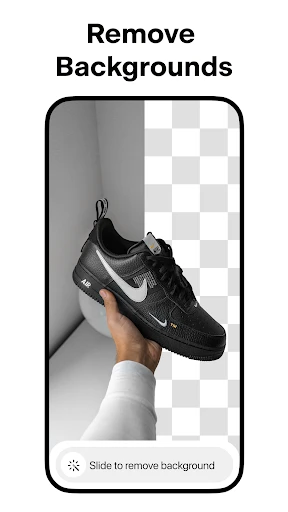


Have you ever browsed your photo gallery, dreaming of giving your images a more polished, professional edge? Allow me to share a recent find: Pixelcut AI Photo Editor. Think of it as a dedicated editing assistant residing in your smartphone, and it truly delivers exceptional results.
Harnessing the Power of AI for Creativity
Upon launching Pixelcut, its sleek and user-friendly design immediately stands out. It’s ideal for users who prefer to start enhancing their photos immediately, bypassing intricate and confusing controls. By utilizing artificial intelligence, the app streamlines the entire editing workflow. The experience is remarkably seamless; the AI handles the core adjustments for elements like lighting and filter application, ensuring your photos look expertly refined with minimal effort.
Notable and Impactful Features
The app’s comprehensive toolkit is immediately apparent. It spans from fundamental actions like cropping and resizing to sophisticated options such as background deletion and object removal. The "magic eraser" function is especially remarkable, allowing you to eliminate distracting elements from an image with a single touch. It’s the perfect solution for those nearly flawless photos that require a minor correction.
The extensive template collection is another highlight. For social media enthusiasts, this feature is transformative. Pixelcut includes pre-designed layouts for Instagram posts, stories, and advertisements. Simply choose a template, add your image, and instantly you have a sleek, ready-to-publish graphic.
Efficiency and User Experience
In terms of performance, Pixelcut is exceptionally robust. It manages high-resolution files effortlessly without slowing down your device, a significant advantage. The app is finely tuned for speed, enabling rapid edits without processing delays. Furthermore, its availability on both Android and iOS platforms ensures wide accessibility.
Additionally, the app is incredibly easy to master. Even with no prior editing experience, Pixelcut’s guided tutorials and intuitive layout allow anyone to quickly begin producing impressive visual content.
Conclusion
In summary, Pixelcut AI Photo Editor has solidified its position as my primary tool for photo enhancement. It merges advanced capabilities with a straightforward interface, catering perfectly to novices and experts alike. Whether your goal is to elevate your social media presence or simply to perfect your personal snapshots, Pixelcut is an outstanding choice.
If you haven't yet experienced it, I highly recommend trying Pixelcut. You may just discover a new passion for transforming your photographs.
Pros
- User-friendly interface for easy navigation
- Wide range of editing tools available
- AI-powered features enhance photo quality
- Supports high-resolution photo exports
- Frequent updates with new features
Cons
- Limited free version features
- Occasional app crashes reported
- Subscription required for premium tools
- Some tools require internet connection
- In-app ads in free version
Frequently Asked Questions
What features does Pixelcut AI Photo Editor offer?
Pixelcut AI Photo Editor provides a vast array of features including AI-powered background removal, photo enhancement, and creative filters. Users can enjoy tools for cropping, resizing, and adding text or graphics to their images. The app also offers templates for social media posts and other design needs, making it versatile for both personal and professional use.
Is Pixelcut AI Photo Editor suitable for beginners?
Yes, Pixelcut AI Photo Editor is designed with a user-friendly interface that makes it accessible even for beginners. The app provides intuitive controls and guided tutorials to help new users understand and make the most out of its features. Whether you're new to photo editing or have some experience, Pixelcut caters to all levels.
Does Pixelcut AI Photo Editor require an internet connection to function?
While some features of Pixelcut AI Photo Editor can be used offline, certain AI functionalities and template downloads require an internet connection. To fully leverage the app's capabilities, it's recommended to have internet access, especially for updates and cloud-based features. Users can edit basic images offline, but for advanced tools, connectivity is beneficial.
Are there any in-app purchases or subscription fees in Pixelcut AI Photo Editor?
Pixelcut AI Photo Editor offers a free version with basic features, but there are premium options available for users who wish to access advanced tools and templates. In-app purchases and subscription plans provide extended capabilities, such as additional filters, high-resolution exports, and exclusive design assets. Users can choose a plan that best suits their editing needs.
What platforms is Pixelcut AI Photo Editor available on?
Pixelcut AI Photo Editor is available on both Android and iOS platforms, allowing a wide range of users to download and utilize its features. The app is optimized for smartphones and tablets, providing a seamless editing experience across devices. Users can find it on the Google Play Store and Apple App Store for easy installation.
Technical Info
Tags
Recommended For You

Housecall Pro

Wavy: Photo Editor & AI Art

SALLY BEAUTY

5 Calls: Contact Your Congress

NIV Bible version, Offline app

KJV Daily Bible - Verse+Audio

Gencraft - AI Art Generator

PSWaves Live Wallpapers

Realtime Charts for Torque Pro

AI Image Generator - Dali

UKG Pro

Monster Job Search

Artistry Virtual Beauty

DeepL Translate

Blink Beauty Cam: Photo Makeup

Sweet Beauty Camera Fillter

Thumbtack for Professionals

Face Shape & Color Analysis

OpenSea: NFT marketplace

telebirr

Pixel Studio PRO: editor

Invoice Maker - Invoice Fly

850 OBD-II
