
Draw Animation - Anim Creator
Art & Design · Draw Animation Create Cartoons For Everyone
Screenshots


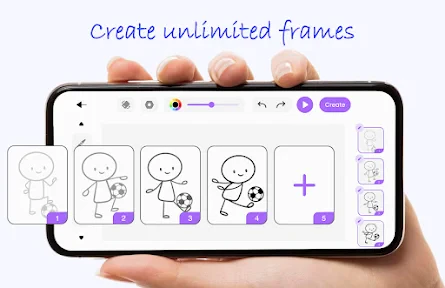
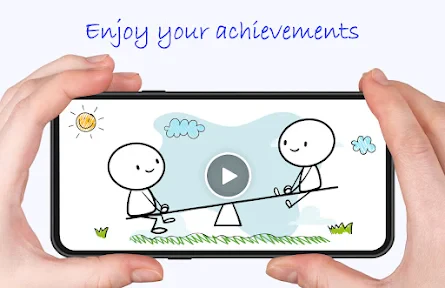
Draw Animation - Anim Creator: Your Digital Animation Studio
Discover the art of animation with Draw Animation - Anim Creator, the intuitive app designed to bring your stories to life. Available for Android and iOS, it serves as the perfect starting point for aspiring animators of all skill levels.
Intuitive Onboarding for Immediate Creation
Upon launching the app, you are greeted by a clean, logically organized interface. The clutter-free design ensures all essential tools are accessible, allowing both beginners and experienced users to dive into their projects without delay.
A Comprehensive and Professional Feature Set
The app boasts an extensive library of brushes and a rich color palette, enabling endless artistic experimentation. The onboard onion skinning tool is a standout, providing a transparent view of previous frames to ensure fluid motion, much like a traditional animator's lightbox.
Support for multiple layers further enhances your creative control, allowing for detailed and complex animations by isolating individual elements of your scene.
Streamlined Frame-by-Frame Animation
The animation process is simplified into a clear workflow: draw your frames, then sequence them to create movement. The instant playback function is invaluable, offering real-time feedback that allows for precise adjustments to timing and motion.
Seamless Export and Sharing
Once your animation is complete, exporting and sharing is straightforward. The app supports various file formats for saving to your device or for direct sharing to social platforms, making it easy to showcase your creative work with the world.
Final Verdict: Power Meets Accessibility
Ultimately, Draw Animation - Anim Creator successfully combines powerful animation tools with an accessible interface. Its thoughtful design and robust features make the creative process both rewarding and enjoyable. Whether crafting a quick GIF or a layered cartoon, this app provides all the necessary tools to unleash your animation potential.
Pros
- User-friendly interface for beginners.
- Wide range of drawing tools available.
- Supports multiple layers for complex animations.
- Export options in various formats.
- Regular updates with new features.
Cons
- Limited free version features.
- Occasional app crashes reported.
- Requires high storage space.
- Some tools lack precision.
- In-app purchases can be pricey.
Frequently Asked Questions
What devices are compatible with Draw Animation - Anim Creator?
Draw Animation - Anim Creator is compatible with most modern Android and iOS devices. It requires Android version 5.0 or later and iOS 11.0 or later. Ensure your device meets these requirements for optimal performance. The app is optimized for both smartphones and tablets, offering a versatile drawing experience across different screen sizes.
Is Draw Animation - Anim Creator suitable for beginners?
Yes, Draw Animation - Anim Creator is designed with an intuitive interface that caters to both beginners and experienced animators. The app offers tutorials and guides to help novices get started with animation. Whether you're creating simple sketches or detailed animations, the app provides tools that are user-friendly and accessible to all skill levels.
Does Draw Animation - Anim Creator support multiple file formats?
Indeed, Draw Animation - Anim Creator supports exporting animations in several formats such as GIF, MP4, and PNG sequences. This flexibility allows users to share their creations on various platforms and use them in different projects. The app ensures high-quality output, making it suitable for both personal and professional use.
Are there in-app purchases or subscriptions in Draw Animation - Anim Creator?
Draw Animation - Anim Creator offers a free version with basic features. However, to unlock advanced tools and features, users can opt for in-app purchases or a subscription model. These purchases enhance the animation experience by providing additional brushes, layers, and export options, making it suitable for more intricate projects.
Can I collaborate with others using Draw Animation - Anim Creator?
While Draw Animation - Anim Creator primarily focuses on solo projects, it does offer features that facilitate collaboration. Users can easily share their project files with others who use the app, allowing for collaborative editing and feedback. This feature is particularly useful for teams or friends working on animation projects together.
Technical Info
Recommended For You
OpenDocument Reader Pro

Imikimi Photo Frames & Effects

Pixelcut AI Photo Editor

HD Camera for Android: 4K Cam

MySpot Driver

Animic AI: Anime Generator

Doodle Art: Magic Drawing App

mobile.de - car market

Bible Launcher-KJV & Prayer

Daily Bible Study: Audio, Plan

Logo Maker : Graphic Designer

OpenSea: NFT marketplace

My Mitsubishi Connect

AR Drawing Sketch Paint

HiPaint -Sketch Draw Paint it!

Garmin Drive™

AR Draw Sketch: Paint & Trace

Logo Maker And Logo Creator 3D

Blinq: Digital Business Card

Pixel Studio PRO: editor

Autotrader: Shop Cars For Sale

[KNA003] SHADOW

Remove Background From Video
