
OBD JScan
Auto & Vehicles · Vehicle Diagnostics App For Jeep Chrysler Dodge RAM Owners
Screenshots


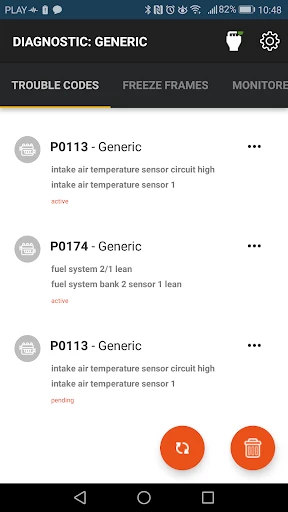
Unlock Advanced Vehicle Diagnostics
Transforming your smartphone into a comprehensive car diagnostic tool is now within reach with OBD JScan. This application serves as a vital bridge for any driver seeking deeper insight into their vehicle's health, merging automotive care with modern technology for a truly empowered ownership experience.
A Direct Link to Your Vehicle's Computer
OBD JScan functions as a direct communication line to your car's internal systems. By utilizing a compact OBD-II adapter, the app accesses the vehicle's computer to read and reset trouble codes. This proactive approach provides early warnings for potential problems, effectively offering a portable diagnostic mechanic at your fingertips.
Streamlined and Simple Setup
The initial setup process is remarkably straightforward. Once the adapter is connected, the app provides clear, step-by-step guidance to establish a link with your vehicle. This user-friendly approach ensures a quick and hassle-free start, requiring no prior technical expertise to begin.
A Comprehensive Diagnostic Suite
The app delivers an extensive array of diagnostic functions. Users can monitor live sensor data, perform system tests, and customize various vehicle settings. Features like real-time data logging enable professional-grade performance review, while adjustments to parameters like tire dimensions unlock a new level of personalized vehicle control.
Intuitive Design and Cross-Platform Utility
Navigation within OBD JScan is intuitive, thanks to a clean interface and logically organized menus. Its broad vehicle compatibility makes it ideal for multi-car households. A particularly valuable feature is the ability to save diagnostic reports, creating a maintainable history of your vehicle's health for accurate long-term tracking.
Essential Tool for Informed Drivers
In conclusion, OBD JScan is a highly recommended tool for anyone invested in vehicle maintenance or automotive knowledge. It provides critical insights that can prevent costly repairs, packaged within an accessible design suitable for all skill levels. This powerful combination of depth and ease of use makes it an exceptional value, revealing the significant potential held within a simple adapter.
Pros
- Comprehensive vehicle diagnostics
- User-friendly interface
- Supports a wide range of vehicles
- Regular updates with new features
- Compatible with various OBD adapters
Cons
- Requires in-app purchases
- Limited free features
- Occasional connectivity issues
- No support for iOS devices
- Complex for beginners
Frequently Asked Questions
What is OBD JScan and how does it work?
OBD JScan is a diagnostic app designed for Jeep and Chrysler vehicles, allowing users to access and read data from their vehicle's onboard computer system. It connects via a compatible OBD-II Bluetooth adapter. Once connected, the app provides detailed information about the vehicle’s performance, error codes, and other essential diagnostics, enabling users to troubleshoot issues effectively.
Is OBD JScan compatible with all vehicles?
OBD JScan is specifically designed for use with Jeep and Chrysler vehicles. It may not be compatible with other brands unless specified. Users should ensure their vehicle supports OBD-II protocols and have the necessary Bluetooth adapter to connect the app, ensuring proper functionality and accurate diagnostics.
What features does OBD JScan offer?
OBD JScan offers a range of features, including real-time data monitoring, access to trouble codes, and the ability to reset warning lights. It also provides configuration options for various vehicle settings and can perform special functions like ABS bleeding and DPF regeneration. The app is continuously updated to include new features and vehicle support.
Do I need any special equipment to use OBD JScan?
Yes, to use OBD JScan, you will need a compatible OBD-II Bluetooth adapter. This adapter connects your smartphone or tablet to your vehicle’s onboard computer system, enabling data transfer between the app and the vehicle. It is essential to ensure the adapter is compatible with both the app and your specific vehicle model.
Is there a cost associated with using OBD JScan?
OBD JScan itself may be downloaded for free, but certain features and functionalities might require in-app purchases or a subscription. Additionally, users need to purchase a compatible OBD-II Bluetooth adapter separately. It's advisable to check the app store for the latest pricing details and any additional costs associated with the app's premium features.
Technical Info
Recommended For You

TruckSmarter Load Board & Fuel

NovelUP — Novel Downloader

Tattoo Maker - Tattoo Design

Quran Majeed – القران الكريم

Holy Bible King James + Audio

Driving Instructor-Theory Test

ScanBizCards Premium

Staffmark WorkNOW

Bible Hub

Package Tracker - pkge Mobile

Haircare app for women

Cvent Events

My Best Colors

Magic Beauty Makeup Camera

Creati AI Photo Generator

FPL
AutoTempest - Car search

Drawing Apps: Draw, Sketch Pad

Glorify: Devotional & Prayer

Joist Invoices for Contractors

ReadEra – book reader pdf epub

Car play/Android Auto Sync

TurboScan™ Pro: PDF scanner
