Microsoft Power BI
Business · Power BI Business Analytics For Data Driven Decisions
Screenshots


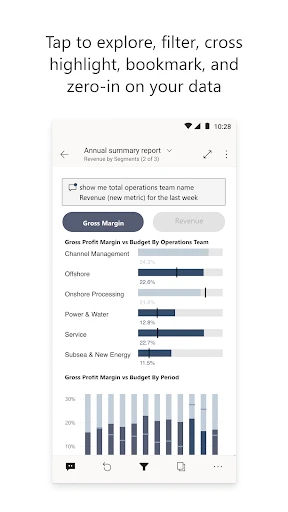


Have you ever found yourself overwhelmed by data, struggling to derive clear meaning from it? Microsoft Power BI acts as your dedicated analytics ally, transforming raw information into actionable insight. Consider it the essential platform for bringing data narratives to life.
Getting Started with Power BI
Beginning your journey with Power BI is an intuitive process. Upon launching the application, a clean and logically organized interface welcomes users of all skill levels. The platform seamlessly connects to a vast array of data sources, from simple Excel spreadsheets to complex cloud-based services, ensuring your existing information can be leveraged immediately.
Transforming Data into Dynamic Visual Stories
The core strength of Power BI lies in its sophisticated visualization capabilities. The suite offers an extensive library of charts, graphs, and maps to suit any analytical need. Through a simple drag-and-drop canvas, you can construct interactive dashboards without writing any code, empowering you to design clear and compelling data stories.
Furthermore, its real-time data processing capability is profoundly impactful. Imagine updating key metrics during a live presentation, ensuring every decision is informed by the very latest information.
Seamless Collaboration and Integration
In today's interconnected work environments, effective collaboration is paramount. Power BI excels in this area by simplifying the sharing of reports and dashboards across your team. Its deep integration with the Microsoft ecosystem, including Teams and SharePoint, allows it to become a natural extension of your daily workflow and a catalyst for team-based analysis.
Insights Wherever You Work
The Power BI mobile application extends this powerful functionality beyond the desktop. It provides full access to your critical dashboards and reports from any location, ensuring key insights are always within reach. The optimized mobile experience delivers a smooth and responsive interface for data review on the go.
Conclusion
In summary, Microsoft Power BI is a comprehensive solution for converting complex datasets into clear, impactful visual intelligence. Its user-friendly design, robust connectivity, and seamless Microsoft integration make it an indispensable tool for any organization. If your objective is to enhance data literacy and communicate findings effectively, Power BI is an investment worth exploring. It may very well become the foundational tool you rely on to navigate the modern data landscape.
Pros
- Intuitive data visualization tools.
- Seamless integration with Microsoft apps.
- Robust data security features.
- Customizable dashboards.
- Strong community support.
Cons
- Steep learning curve for beginners.
- Limited offline capabilities.
- Can be resource-intensive.
- Occasional sync issues.
- Premium features are costly.
Frequently Asked Questions
What is Microsoft Power BI and what are its primary uses?
Microsoft Power BI is a business analytics service that provides interactive visualizations and business intelligence capabilities with an interface simple enough for end users to create their own reports and dashboards. It is primarily used for transforming raw data into informative insights, helping organizations make data-driven decisions efficiently. Users can connect various data sources, create complex data models, and visualize data through a range of customizable dashboards and reports.
Is Microsoft Power BI free to use, and what are the different pricing options available?
Microsoft Power BI offers a free version with limited features suitable for individual use. For more advanced needs, there are paid versions: Power BI Pro and Power BI Premium. Power BI Pro includes full access to the Power BI service, enabling collaboration, sharing, and ad hoc analysis for $9.99 per user per month. Power BI Premium is designed for larger enterprises, providing dedicated cloud resources and enhanced performance, with pricing based on capacity rather than per user.
What platforms and devices are compatible with Microsoft Power BI?
Microsoft Power BI is highly versatile and can be accessed on multiple platforms and devices. It is available on Windows, Mac, and mobile devices via iOS and Android apps. Users can also access Power BI through web browsers, ensuring flexibility for users to view and interact with their data on the go, regardless of the device they are using. This cross-platform compatibility makes it a convenient tool for business professionals.
How secure is Microsoft Power BI for handling sensitive business data?
Security is a paramount feature of Microsoft Power BI, as it complies with stringent data protection standards and regulations. It employs advanced encryption methods both at rest and in transit. Moreover, Power BI offers comprehensive security controls such as role-based access, data loss prevention, and real-time monitoring. Users can be assured of secure data handling and privacy, making it a trusted choice for businesses dealing with confidential information.
Can Microsoft Power BI integrate with other tools and services?
Yes, Microsoft Power BI is designed to integrate seamlessly with a wide array of tools and services. It can connect with other Microsoft products such as Azure, Excel, and SQL Server, as well as third-party services like Google Analytics, Salesforce, and SAP. This integration capability allows users to combine data from various sources, facilitating a more comprehensive analysis and enabling better-informed decision-making processes.
Technical Info
Recommended For You

Beauty Camera: Selfie Editor

RhymeZone Rhyming Dictionary

WhenToWork Employee Scheduling

The Book of Mormon

Holy Bible Time-Verses&Audio

Fresha for business

Xcel Energy

Luvme Hair

CloudLibrary

myAudi

Quranly

mobile.de - car market

Forex Trading for Beginners

CL theme 3D Glass

Workvivo

Monster Job Search

CL theme V1

Esports Logo Maker

Fiverr - Freelance Service

Mark - AI Logo Generator

CL Theme Card

Chevron

Blink Charging Mobile App