
Whova - Event & Conference App
Business · Whova Connects Event Attendees Networking And Engagement
Screenshots


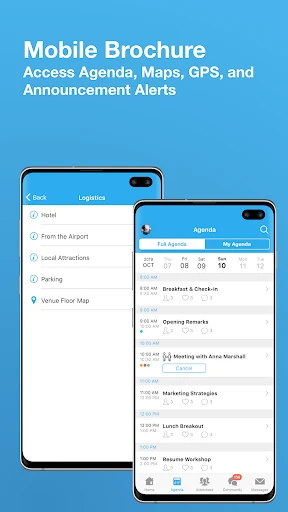


Whova: Your Essential Event Companion
For anyone navigating conferences and professional gatherings, the Whova app transforms the entire experience, acting as an indispensable digital ally.
Simple Setup Process
Getting started with Whova is straightforward. Available on both iOS and Android platforms, a quick download from your app store is followed by an intuitive account creation or login procedure. The setup is seamless, allowing you to move swiftly into the app's core functionalities.
Centralized Event Management
Whova excels by consolidating all your event details into a single, organized hub. Access schedules, speaker biographies, and venue layouts for your registered events with ease. The ability to build a personalized agenda and receive real-time updates eliminates the clutter of printed materials and constant email checks.
Streamlined Networking Tools
The app effectively reduces the barriers to networking. You can view attendee lists and initiate connections before, during, and after an event. Its integrated messaging function is particularly valuable for coordinating meetings and exchanging contact information, serving as a perpetual digital business card.
Interactive Engagement Features
Whova actively enhances participation through live polls, Q&A sessions, and interactive elements. Contributing to a real-time poll and seeing collective results fosters immediate discussion. The community board further encourages dialogue among attendees, creating a more dynamic and connected environment.
The integrated photo sharing capability allows you to capture and post moments directly, contributing to a communal event gallery and preserving memorable highlights.
Conclusion
In summary, Whova is a pivotal tool for frequent event attendees and organizers alike. It streamlines logistics, simplifies networking, and boosts engagement, significantly enriching the overall event experience. For your next conference, downloading Whova is a recommended step toward a more connected and efficient participation.
Pros
- User-friendly interface.
- Seamless event check-in.
- Detailed agenda management.
- Networking opportunities.
- Real-time updates.
Cons
- Requires internet connection.
- Limited free features.
- Occasional app crashes.
- Notification overload.
- Learning curve for new users.
Frequently Asked Questions
What is Whova - Event & Conference App?
Whova is an award-winning event and conference management app designed to streamline the experience for both attendees and organizers. It offers features like agenda management, networking opportunities, live polls, and more, making it easier to enhance engagement at events. It's suitable for conferences, trade shows, and corporate meetings.
How does Whova enhance networking at events?
Whova enhances networking by providing tools such as attendee profiles, messaging, and community boards. Users can view profiles of other event participants and send messages to connect. Additionally, Whova's community board feature allows attendees to engage in discussions, plan meetups, and post questions, facilitating a more interactive and connected event experience.
Is Whova app user-friendly for first-time users?
Yes, Whova is designed to be user-friendly, even for first-time users. The app features an intuitive interface that guides users through the event experience. With easy access to agendas, speaker information, and maps, users can quickly familiarize themselves with the app's functionalities, ensuring they get the most out of their event participation.
What devices are compatible with Whova?
Whova is compatible with both Android and iOS devices, making it accessible to a wide range of users. Whether you are using a smartphone or a tablet, you can easily download the app from Google Play Store or Apple App Store, ensuring that you can stay connected and informed during your events, regardless of your device.
Are there any costs associated with using Whova?
The cost of using Whova can vary depending on whether you are an event organizer or an attendee. While attendees can often use the app for free, organizers might need to purchase a plan to utilize the full range of features available for event management. It's advisable to check with the event organizers or Whova's pricing page for specific details.
Technical Info
Recommended For You

Jobber: Field Service Software

Manobook - Los Besos de Jacob

Kelley Blue Book: We Know Cars

Blink Charging Mobile App

AR Draw Sketch: Trace & Paint

Auto Sync for Android/Car Play

Sky Tonight - Star Gazer Guide

Vivaldi Color Analysis

Color Analysis - Dressika

PrinterShare Premium Key

RepairSolutions2

Life Bible

Driving Instructor-Theory Test
[KNA008] COMBINE

Nail Art Design : Nails Polish

Skin Bliss: Skincare Routines

Webmotors: comprar carro

Magnificat Lenten 2025

Learn To Draw Step By Step

HerBible--Verses&Prayer

PixShift: BackGround Changer

NotanIzer

Print Photo - Print to Size
