
NES.emu (NES Emulator)
Arcade · NES Emulator For Retro Gaming Enthusiasts
Screenshots
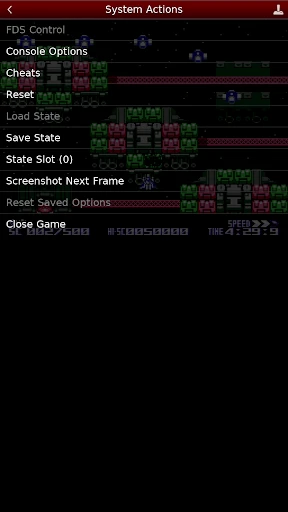
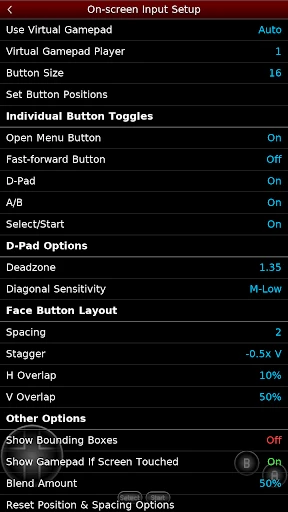
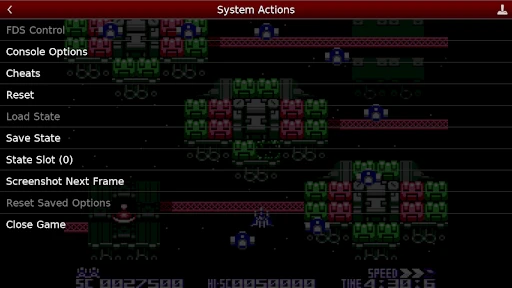
An Essential Emulator for Classic Gaming
For anyone passionate about retro gaming, NES.emu stands out as a premier NES emulator on Android and iOS. This app offers a perfect portal to the iconic 8-bit era, making it an indispensable tool for both lifelong fans and newcomers eager to explore gaming history.
Simple and Intuitive Setup Process
Getting started with NES.emu is remarkably simple. After a quick download from your app store, you are just moments away from playing. The app avoids any complicated configuration, ensuring you spend less time setting up and more time gaming.
Its interface is designed for clarity and ease of use. All options and menus are straightforward, requiring no technical expertise to navigate. This accessibility makes the emulator welcoming for users of all experience levels.
A Robust Suite of Enhanced Features
The core strength of NES.emu lies in its comprehensive feature set. It boasts extensive compatibility, supporting a huge library of classic NES titles so you can reliably play your favorite games.
Control customization is a major highlight. You can fully adjust the on-screen layout for comfort and also connect external Bluetooth controllers. This flexibility transforms your mobile device into a versatile gaming handheld.
Smooth Performance and Authentic Presentation
In terms of performance, NES.emu operates flawlessly. Games load rapidly and run with smooth, accurate graphics that faithfully preserve the original pixel-art aesthetic. The experience is stable and free from disruptive lag or crashes.
The emulator also delivers exceptional audio quality. Every chirp, melody, and sound effect is reproduced with precision, immersing you completely in the authentic 8-bit soundscape of your childhood.
Advanced Playthrough Utilities
NES.emu greatly enhances playability with save state functionality. This allows you to save your progress at any exact moment, eliminating the need to rely on old-fashioned password systems or complete games in a single sitting.
For an added layer of fun, the app includes support for cheat codes. These can provide helpful advantages like unlimited lives or power-ups, offering a new way to enjoy classic challenges.
The Definitive Mobile Retro Experience
Overall, NES.emu is a top-tier emulator that masterfully recreates the NES experience on modern devices. Its combination of user-friendly design, powerful features, and reliable performance makes it a standout choice.
Prepare to dive back into the classics. With NES.emu, a vast collection of timeless gaming adventures is always ready to play in your pocket.
Pros
- High compatibility with NES games.
- Supports Bluetooth controllers.
- Customizable on-screen controls.
- Save and load game states easily.
- Smooth and lag-free gameplay.
Cons
- Limited free version features.
- Ads present in free version.
- Occasional minor bugs.
- No built-in game library.
- Requires ROMs for gameplay.
Frequently Asked Questions
What is NES.emu and what platforms is it available on?
NES.emu is a high-performance Nintendo Entertainment System emulator designed for Android and iOS devices. It allows users to play classic NES games on modern smartphones and tablets. With a user-friendly interface and robust features, it caters to both casual gamers and those seeking nostalgia for retro games. It supports a vast library of NES game ROMs, providing a seamless gaming experience.
What are the main features of NES.emu?
NES.emu offers a wide range of features including support for various file formats such as .nes and .unf, customizable on-screen controls, and external controller support. It provides high-quality rendering with options for aspect ratio and display scaling. Users can save and load game states, allowing them to pick up right where they left off. The emulator also supports cheat codes for an enhanced gameplay experience.
How do I load games onto NES.emu?
To load games onto NES.emu, users need to download NES game ROMs from trusted sources online. Once downloaded, these ROM files can be transferred to the device where NES.emu is installed. Within the app, users can browse and select the ROM file to start playing. It’s important to ensure that downloading ROMs complies with copyright laws in your region.
Is NES.emu compatible with external controllers?
Yes, NES.emu is compatible with a variety of external controllers, offering gamers a more authentic and comfortable playing experience. Users can connect Bluetooth gamepads or USB controllers to their device, and the emulator will recognize and map the controls accordingly. This feature is particularly beneficial for those who prefer physical buttons over touchscreen controls.
Do I need to root or jailbreak my device to use NES.emu?
No, there is no need to root or jailbreak your device to use NES.emu. The emulator is designed to work on standard Android and iOS devices without requiring any modifications. This ensures that users can enjoy their favorite NES games without compromising the security or warranty of their devices.
Technical Info
Recommended For You

Chess Master: Board Game
Elastic Playground:Ragdoll Fun

60 Seconds! Atomic Adventure

Super Mario Run

Gym Heros: Fighting Game

Hidden Folks: Scavenger Hunt

Draw Climber

Die Again: Troll Game Ever

War Robots Multiplayer Battles

Vita Solitaire for Seniors

M64Plus FZ Pro Emulator

War Sniper: FPS Shooting Game

Number Crush: Match Ten Puzzle

Cronblizz Blitz

Fruit Ninja®

Pizza Boy A Pro

Zen Mahjong: Classic Tiles

Bouncemasters: Penguin Games

Graffiti Quote Color by number

Free Fire: Winterlands

Tilescapes - Onnect Match Game

Solitaire Dog Rescue

Yu-Gi-Oh! Master Duel
