Genius: AI Photo Generator
Art & Design · Genius AI Art Generator Create Stunning Visuals For Everyone
Screenshots

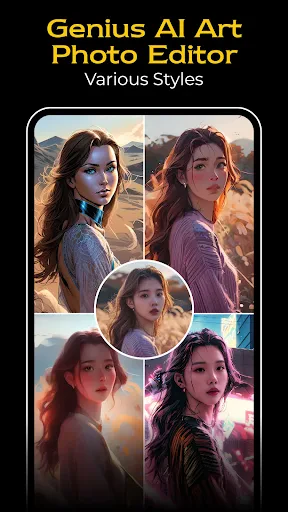


Have you ever scrolled through Instagram and marveled at those perfectly composed photos? I certainly have, and my search for that level of polish led me to Genius: AI Photo Generator. This app is the key to creating those captivating images, and I’m here to explore exactly what gives it such power.
Empower Your Creativity with Artificial Intelligence
Genius: AI Photo Generator acts as a pocket-sized digital art studio. By leveraging advanced AI, it transforms your ordinary snapshots into extraordinary visual creations. What stands out immediately is its accessibility. No specialized technical knowledge or professional photography skills are required. Simply select an image from your gallery or capture a new one, and allow the app’s intelligence to take over.
Capabilities Designed to Captivate
First, consider the extensive filter library. It offers a diverse array of styles, each uniquely compelling. Whether you prefer a nostalgic aesthetic or a cutting-edge digital look, a filter exists to match your vision. The AI goes beyond simple color adjustments; it intelligently analyzes the mood and composition of your photo, ensuring each enhancement feels custom-tailored.
Then, there are the intuitive editing controls. Adjustments like brightness, contrast, and saturation are made effortlessly. A particularly helpful feature is the AI-powered suggestion system, which provides recommendations based on your image's content—perfect for moments when you need a little creative direction.
The Technology Behind the Transformations
In simple terms, the app’s core is a machine learning model trained on vast datasets of imagery. This means its capabilities evolve and refine with continued use. As you explore different features, the app effectively learns alongside you, leading to progressively more impressive results. This adaptive quality makes the experience feel personalized and growing.
Speed is another significant advantage. The AI processes your photos in mere seconds, making it an ideal tool for quickly preparing and sharing your best moments online.
Final Impressions
In summary, Genius: AI Photo Generator is a revolutionary tool for anyone looking to elevate their photography. It combines user-friendly design with sophisticated output, all within an enjoyable experience. While it may not replace complex professional software for intricate projects, it is exceptional for everyday photo enhancement and social media content. If you love sharing creatively enhanced moments, this app is a must-try. It delivers the satisfaction of expert-level edits with minimal effort.
I encourage you to experiment with Genius: AI Photo Generator and witness your photos undergo stunning transformations. Your social media galleries will reach an entirely new standard of visual appeal.
Pros
- Impressive AI-generated photo quality
- User-friendly interface for easy navigation
- Wide range of photo styles available
- Fast processing and photo generation
- Regular updates with new features
Cons
- Requires a stable internet connection
- Limited free version features
- Occasional app crashes reported
- In-app purchases can be pricey
- Some features require learning curve
Frequently Asked Questions
What is Genius: AI Photo Generator and how does it work?
Genius: AI Photo Generator is an advanced application that utilizes artificial intelligence to create stunning and realistic photos from various inputs. Whether you want to enhance existing images or generate new ones from scratch, this app offers a wide array of tools and filters. Users can input text descriptions, sketches, or even other images to generate a new, unique photo. Its AI algorithms ensure high-quality image output, making it an excellent tool for both personal and professional use.
Is Genius: AI Photo Generator free to use or does it require a subscription?
Genius: AI Photo Generator offers a free version with limited features, allowing users to explore basic functionalities and generate a set number of images per day. For those who wish to access premium features, such as higher resolution outputs, additional filters, and unlimited image generation, a subscription is required. Various subscription plans are available, catering to different user needs and budgets.
What devices are compatible with Genius: AI Photo Generator?
Genius: AI Photo Generator is compatible with both Android and iOS devices, ensuring a wide range of users can access its features. The app is optimized for smartphones and tablets, providing a seamless user experience across different screen sizes. To run the app smoothly, your device should have the latest version of the operating system and sufficient storage space for generated images.
How secure is my data when using Genius: AI Photo Generator?
User privacy and data security are top priorities for Genius: AI Photo Generator. The app employs robust encryption methods to protect any images and personal information shared on the platform. Users can rest assured that their data is not shared with third parties without consent. Additionally, the app regularly updates its security protocols to guard against any potential threats, ensuring a safe user experience.
What kind of support is available if I encounter issues with Genius: AI Photo Generator?
Genius: AI Photo Generator offers comprehensive customer support to assist users with any issues or inquiries. Users can access a detailed FAQ section within the app, providing answers to common questions and troubleshooting tips. For more personalized assistance, users can contact the support team via email or in-app chat, where experienced representatives are ready to provide timely help and guidance.
Technical Info
Tags
Recommended For You

WhenToWork Employee Scheduling

JobStack for Work | Job Search

Mirror Plus - HD Mirror app

The Cepher

Learn how to draw - ArtWorkout

AI Clothes Try-On: DressTry

AI Hairstyle Try On・Wigs・Bangs

ArtCanvas: Learn how to draw

PayPal POS (ex Zettle)

Garmin Drive™

Dreame-Read Romance Stories

ESV Bible

ScanBizCards Premium

eHub

PENUP – Drawing-sharing SNS

Kelley Blue Book: We Know Cars

Penny Puss 2.0

Bible Homescreen - Read Now

King James Bible - Verse+Audio

AutoExpreso Móvil

AR Drawing Paint Sketch Trace

AR Drawing: Art, Trace, Sketch

AnExplorer Pro File Transfer