
AR Drawing: Paint & Sketch Art
Art & Design · AR Drawing Trace To Create Art For All
Screenshots
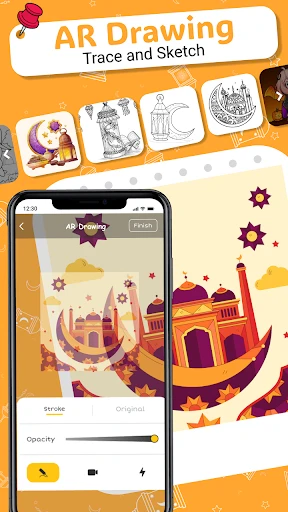


Explore the Fusion of Art and Technology with AR Drawing
AR Drawing: Paint & Sketch Art unlocks a new dimension of creativity directly from your mobile device. This innovative application blends augmented reality with artistic creation, delivering a unique and engaging platform that is as educational as it is entertaining.
Getting Started with the App
AR Drawing: Paint & Sketch Art is distinguished by its intuitive and accessible design. Upon launching the app, a clear tutorial introduces the augmented reality features, providing guidance akin to a personal art instructor ready to help visualize your concepts.
Setup is straightforward: all that's required is a smartphone with a functional camera. The application utilizes this camera to project reference images onto any chosen surface—be it paper, canvas, or fabric. You then trace these guided projections to create your artwork, transforming the process into a magical experience.
Features and Creative Tools
The app is equipped with a robust suite of features to fuel your imagination. Choose from an extensive library of pre-designed templates or create your own from scratch. A diverse palette of brushes and colors is available, allowing you to experiment with and master different artistic techniques.
A particularly valuable feature is the layering capability. This allows for the construction of artwork in stages, preserving earlier work while adding new details. It’s an excellent tool for complex projects and a practical way for newcomers to understand foundational art principles.
Why You Should Experience AR Drawing
The greatest strength of this app is its democratization of art. It is designed for all skill levels, serving as a novel tool for seasoned artists and an encouraging, low-pressure starting point for absolute beginners.
Beyond its utility, the app is genuinely enjoyable. The augmented reality integration makes drawing an interactive and playful activity, offering a refreshing creative outlet for both children and adults to explore.
Final Impressions on AR Drawing
In conclusion, AR Drawing: Paint & Sketch Art is a compelling download for anyone interested in the intersection of creativity and innovation. It bridges traditional sketching with cutting-edge digital art, opening up distinctive avenues for creative expression. While it offers a different sensation than physical media, it successfully pioneers new methods for artistic creation.
If you are fascinated by the potential of technology to enhance art, consider trying AR Drawing: Paint & Sketch Art. You may discover an unexpected passion and unlock creative abilities waiting to be revealed.
Pros
- Enhances creativity with AR feature.
- User-friendly interface for beginners.
- Wide variety of drawing tools.
- Supports real-time collaboration.
- High-quality output resolution.
Cons
- Requires a stable internet connection.
- Limited free features available.
- Consumes significant battery life.
- Occasional app crashes reported.
- Not compatible with all devices.
Frequently Asked Questions
What is AR Drawing: Paint & Sketch Art and how does it work?
AR Drawing: Paint & Sketch Art is an innovative application that allows users to create stunning artwork using augmented reality technology. By projecting a digital sketch onto a real-world surface, users can trace and draw with precision. Perfect for artists and hobbyists, it provides step-by-step guidance to enhance your drawing skills, making it accessible for both beginners and experienced artists alike.
Is AR Drawing: Paint & Sketch Art suitable for beginners?
Yes, AR Drawing: Paint & Sketch Art is designed to be user-friendly and accessible to artists of all levels, including beginners. The app offers tutorials and step-by-step instructions to help users learn the basics of drawing and sketching. With its intuitive interface and helpful features, even those new to art can quickly start creating impressive artworks.
Can I use AR Drawing: Paint & Sketch Art without an internet connection?
AR Drawing: Paint & Sketch Art offers offline functionality, allowing users to access most of its features without an internet connection. This means you can continue creating and working on your art projects anytime, anywhere. However, some features, like downloading new templates or sharing your work online, may require an internet connection.
What devices are compatible with AR Drawing: Paint & Sketch Art?
AR Drawing: Paint & Sketch Art is available for both Android and iOS platforms. It is compatible with most modern smartphones and tablets that support augmented reality technology. To ensure optimal performance, it is recommended to use the app on devices running the latest operating system versions with adequate processing power and camera capabilities.
Are there any in-app purchases or subscription fees in AR Drawing: Paint & Sketch Art?
While AR Drawing: Paint & Sketch Art offers a wide range of free features, it also includes optional in-app purchases and subscription plans for users who wish to access premium content. These may include advanced tools, exclusive templates, and ad-free experiences. Users can enjoy the basic functionalities without spending, but premium options enhance the app's capabilities for dedicated artists.
Technical Info
Recommended For You

SAP Concur

Google Ads

Animagic: Anime Art Generator

Skincare Routine

네이버 - NAVER

Passio GO!

Driving Instructor-Theory Test

Translate Now: All Languages

ExtraMile Rewards®

Fonto - story font for IG

Marathon ARCO Rewards

Yelp for Business

Photoleap: AI Photo Generator

BeautifyX - AI Makeover Studio

AR Drawing : Trace Anything

OBDeleven VAG car diagnostics

GIMP
Sunoco: Pay fast & save

PAeDocket

Barber Chop

Logo Master - Design & Maker
[KNA008] COMBINE

Pocket Novel
