Adobe Capture: Illustrator,Ps
Art & Design · Adobe Capture Turns Photos Into Vectors Brushes Colors Fonts
Screenshots


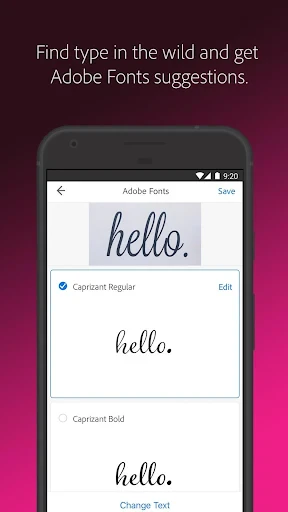


Your Portable Creative Hub: Introducing Adobe Capture
Have you ever felt creatively blocked, hunting for inspiration or the right resource to realize your vision? Meet Adobe Capture. Consider it a full-featured design studio that fits in your pocket, a transformative tool for hobbyists and professional designers alike.
Create Inspiration Anywhere
Imagine this: you encounter a stunning color combination on a street poster. With Adobe Capture, simply capture an image to extract that precise palette for your designs. This power to instantly generate color themes is a core feature, invaluable for both professional workflows and personal creative exploration.
Capture Textures and Patterns
The functionality extends further. Transform any photograph into a seamless pattern or a detailed texture. From the delicate grain of wood to the repetitive geometry of tiles, this app converts real-world details into digital assets you can integrate directly into your artwork, simplifying the creation of complex surfaces.
Design Custom Brushes and Vector Shapes
For many, the brush creation tool is a standout feature. Convert your own sketches or found imagery into custom brushes for Adobe Photoshop or Illustrator, allowing you to infuse projects with a distinct, personal touch.
Similarly, the shape converter turns images into clean, editable vector shapes, providing professional-grade graphic components. It acts as an instant vectorization assistant, ready to elevate your design elements.
Seamless Creative Cloud Integration
A major benefit is its deep integration with Adobe Creative Cloud. All your assets save and sync automatically, letting you start a concept on mobile and refine it on desktop without friction. For creatives on the move, this connectivity is indispensable, effectively making your entire toolkit omnipresent.
Adobe Capture is not merely an application; it's a portal to continuous creativity. It empowers you to harvest inspiration from your environment and transform it into practical digital resources. Despite its advanced capabilities, the interface remains intuitive and accessible, welcoming users at all skill levels.
For those seeking to enhance their creative process, Adobe Capture is an essential exploration. It serves as a vital asset for any design enthusiast, packed with features that spark motivation and expand artistic potential. Give it a try—you may discover it’s the key to unlocking your next great idea.
Pros
- Intuitive interface for easy use.
- Seamlessly integrates with Adobe apps.
- High-quality image capturing.
- Offers diverse creative tools.
- Regular updates enhance features.
Cons
- Requires Adobe account to access.
- Premium features need subscription.
- Resource-heavy
- may slow device.
- Limited offline functionality.
Frequently Asked Questions
What is Adobe Capture: Illustrator, Ps used for?
Adobe Capture is a versatile mobile app that transforms your smartphone into a creation hub for graphic designers and artists. It allows users to capture images and convert them into vector graphics, patterns, color themes, brushes, and shapes that can be used in Adobe Illustrator and Photoshop. It's a powerful tool for those looking to integrate real-world elements into their digital design projects.
Is Adobe Capture available for both Android and iOS devices?
Yes, Adobe Capture is available for download on both Android and iOS platforms. Users can find the app on Google Play Store for Android devices and the App Store for iOS devices. This accessibility ensures that a wide range of users can utilize Adobe Capture's features regardless of their preferred mobile operating system.
Do I need an Adobe Creative Cloud subscription to use Adobe Capture?
While Adobe Capture can be used as a standalone app for basic functionalities, to unlock its full potential and seamlessly integrate with other Adobe products like Illustrator and Photoshop, an Adobe Creative Cloud subscription is recommended. This subscription allows for cloud storage, access to additional features, and an enhanced workflow between Adobe's suite of applications.
Can Adobe Capture be used offline?
Adobe Capture requires an internet connection to download the app and to sync with Adobe Creative Cloud. However, users can capture images and make creations offline. Once the device is connected to the internet, these creations can be synced with your Creative Cloud account, allowing for easy access and integration into other Adobe applications.
What are some of the key features of Adobe Capture?
Adobe Capture offers a range of key features that make it an essential tool for designers, including the ability to create color themes from real-world images, generate vector shapes from photos, and develop custom brushes and patterns. Additionally, it provides seamless integration with Adobe's other applications, enabling users to bring their creative ideas to life efficiently and effectively.
Technical Info
Recommended For You

TCA Plus (TCA 2024)

Paint

Joyread

MessengerX App

Meeting - Video Conference

AI Video - AI Video Generator

Picture Editor

MobiOffice: Word, Sheets, PDF

Cookie Cutters

CL Theme Road

Carmin

Xcel Energy

AI Outfits: Try on Clothes

My Best Colors

GigU

Glam AI

7shifts: Employee Scheduling

Yaelokre OC Maker

Barnes & Noble NOOK

Anime AI - Photo Maker

Desygner: Graphic Design Maker

InstaFeet

DAT One