
Textify- Art Font Photo Editor
Art & Design · Art font photo editor for stylish social media content
Screenshots

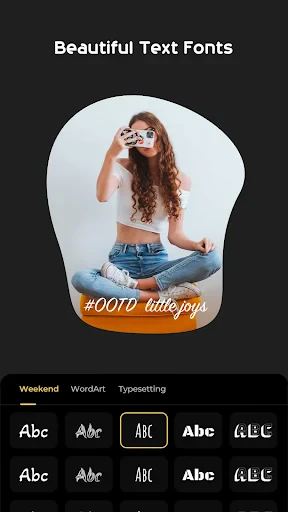


Discover Textify: The Art Font Photo Editor
Do you ever see stunning, text-enhanced images on social media and wish you could create them? Meet Textify- Art Font Photo Editor, the intuitive app designed to add a touch of creative magic to your photographs.
Express Your Creativity with Textify
Textify acts as your digital creative partner, offering a vast selection of artistic fonts, vibrant colors, and customizable tools. Transform ordinary photos into extraordinary visual art, whether you aim for elegance with a script font or impact with a bold, contemporary typeface.
Textify prioritizes simplicity with a clean, user-friendly interface. The editing process is effortless: choose a photo, browse the perfect font, and start designing. You’ll achieve professional-looking results quickly, regardless of your technical skill.
Key Features to Explore
At the heart of Textify is an extensive and growing font library. Choose from hundreds of styles, from classic serifs to playful handwritten options, ensuring you always find the ideal match for your project. New fonts are added regularly to keep your designs fresh and trendy.
Beyond fonts, Textify provides deep customization. Adjust text size, color, and opacity, apply shadows for depth, or curve text along shapes. It’s a comprehensive design toolkit, condensed into a single, powerful app on your device.
Why You'll Love Using Textify
Textify is more than an editor—it's a platform for personal expression. Create custom greeting cards, motivational graphics, or enhanced personal photos, turning your concepts into polished visual statements. The satisfaction of seeing your finished, professional-looking art is unparalleled.
Textify also streamlines sharing your creations. With seamless integration, you can post your artwork directly to Instagram, Facebook, and Twitter in just one tap, ensuring your designs gain immediate visibility and appreciation.
Final Thoughts
In today's visual landscape, Textify- Art Font Photo Editor is an essential creative asset. It empowers you to craft beautiful visual narratives from your photos, making the process both simple and enjoyable. Unleash your inner artist, add that magical spark to your images, and try Textify today. Your social media presence will undoubtedly shine brighter.
Pros
- User-friendly interface enhances creativity
- Wide range of fonts and styles available
- Supports high-resolution photo editing
- Offers a variety of artistic filters
- Regular updates with new features
Cons
- In-app purchases required for premium fonts
- Limited free templates for beginners
- Occasional ads can disrupt workflow
- Requires internet for full functionality
- No option for batch photo editing
Frequently Asked Questions
What features does Textify - Art Font Photo Editor offer?
Textify - Art Font Photo Editor provides a wide array of features including customizable art fonts, text overlays, and various photo editing tools. Users can personalize their images with stylish typography, add creative filters, and utilize different design templates to enhance their photos, making them perfect for social media sharing or personal projects.
Is Textify - Art Font Photo Editor free to use?
Textify - Art Font Photo Editor offers a free version with basic features. However, to access premium fonts, advanced editing tools, and an ad-free experience, users can opt for a subscription plan or make in-app purchases. This allows users to unlock the full potential of the app for a more comprehensive editing experience.
How user-friendly is Textify - Art Font Photo Editor for beginners?
Textify - Art Font Photo Editor is designed with a user-friendly interface that is ideal for both beginners and experienced users. The app offers intuitive navigation, easy-to-use editing tools, and step-by-step guides for creating stunning photo edits. Beginners will find the app accessible, while advanced users can enjoy its robust feature set.
Can I use Textify - Art Font Photo Editor on multiple devices?
Yes, Textify - Art Font Photo Editor supports cross-device usage. You can install and use the app on multiple devices, whether Android or iOS, with a single account. This feature ensures that your projects are synchronized and accessible across different platforms, making it convenient to edit on-the-go.
What are the system requirements for installing Textify - Art Font Photo Editor?
To install Textify - Art Font Photo Editor, your device should meet certain system requirements. For Android users, the app requires Android version 5.0 or higher, while iOS users need iOS 10.0 or later. Additionally, sufficient storage space is necessary to download and install the app along with its resources for optimal performance.
Technical Info
Recommended For You

Coloring games: speed drawing

СL Theme Line

Carmin

Visual Voicemail

Skincare and Face Care Routine

UPS

Camouflage Doors Mod for MCPE

Auto Sync for Android/Car Play

CL theme V1

Shipt: Shopper and Driver

Anime Avatar Maker & Creator

Twenty-Four Hours a Day

ThinkDiag+

O'Reilly Pro

Skin Bliss: Skincare Routines

Jewelry Women Jewellery Photo

Sweet Camera Selfie

FX File Explorer: Plus License

Vehicleinfo - RTO Information

Books - Read and Download

ElevenReader - Text to Speech
OBD2 Car Scanner - ELM Torque

Planity
