Color Wheel
Art & Design · Color Wheel App Create Harmonious Palettes For Designers
Screenshots


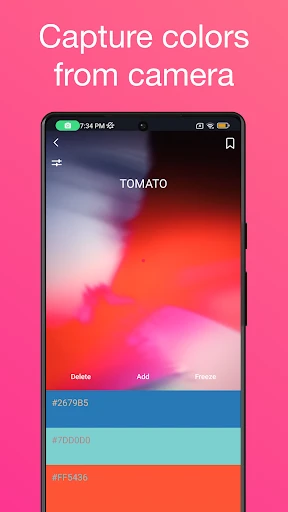

Your Ultimate Digital Color Companion
Struggling to break free from repetitive color choices in your creative work? The Color Wheel app arrives as your essential partner for exploring hues, shades, and tones. Designed for artists, designers, and color enthusiasts, this tool aims to revolutionize your palette selection process. Let’s explore what makes it stand out.
An Intuitive and Vibrant Interface
The Color Wheel app immediately captivates with a sleek, modern, and user-friendly interface. Upon launching, you are welcomed by a vibrant, interactive spectrum that invites immediate exploration and experimentation.
Its core strength lies in the intelligent color harmony tool. It effortlessly generates complementary, analogous, and triadic schemes, serving as a personal color advisor at your fingertips. Discovering perfectly balanced combinations for any project becomes simple and instantaneous.
Powerful Tools for Precision and Inspiration
This app extends far beyond basic suggestions with a sophisticated color picker for fine-tuning. Delve into specific shades and tones, with each color’s RGB and HEX codes clearly displayed for exact digital implementation.
A curated library of pre-made palettes offers endless inspiration, catering to every theme from vibrant seasonal projects to subdued professional designs. Save your most-loved combinations for quick future access.
A standout capability allows you to upload any image and extract its dominant colors directly. Capture the palette of a breathtaking photograph or inspiring decor instantly, seamlessly translating real-world color into your creative projects.
An Essential Tool for Creative Vision
In the vital realm of color design, the Color Wheel app proves indispensable. It eliminates the uncertainty of palette creation, allowing you to channel all your energy into executing your creative vision with confidence.
From professional workflows to personal projects, this feature-rich and enjoyable app is a vital addition. It transforms how you interact with color. Discover for yourself how it can elevate and inspire your work.
Pros
- User-friendly interface for easy navigation
- Wide range of color options available
- Customizable color palettes
- Supports color harmony rules
- Low system resource usage
Cons
- Limited advanced features for professionals
- Occasional app crashes reported
- Ads can be intrusive at times
- Lacks integration with design software
- No offline mode available
Frequently Asked Questions
What is the primary function of the Color Wheel app?
The Color Wheel app is designed to assist users in selecting and creating color palettes for various design projects. Whether you're a graphic designer, interior decorator, or an artist, this app provides a digital version of the traditional color wheel, making it easy to find complementary colors, triads, and more. Its intuitive interface allows users to experiment with different color combinations, ensuring that they find the perfect palette for their needs.
Can I use the Color Wheel app offline?
Yes, the Color Wheel app can be used offline. Once downloaded, all the features are accessible without an internet connection. This makes it convenient for users who need to work on projects while traveling or in areas with limited connectivity. However, any updates or additional downloadable content will require an internet connection.
Is the Color Wheel app suitable for beginners?
Absolutely, the Color Wheel app is user-friendly and suitable for beginners. It includes tutorials and guides on color theory, making it easy for anyone to learn about color harmonies and contrasts. The clean and straightforward interface ensures that users, regardless of their experience level, can navigate through the app and utilize its features efficiently.
Does the Color Wheel app support exporting color palettes?
Yes, the Color Wheel app supports exporting color palettes. Users can save their custom palettes and export them in various formats, such as PNG, PDF, or as a palette file compatible with popular design software. This feature is particularly useful for designers who need to share their palettes with clients or collaborators.
Are there any in-app purchases or subscriptions required?
The Color Wheel app is free to download and offers a range of basic features at no cost. However, there are in-app purchases available for users who want to access premium features, such as advanced color tools and additional palette templates. There is also an optional subscription model that provides regular updates and exclusive content for subscribers.
Technical Info
Recommended For You

Tor OBD2 Diagnostics

AutoTempest - Car search

EPUB Reader for all books

Face Shape - Pretty Scale

Draw Cartoons 2 PRO

YouVersion Bible App + Audio

Zoom Rooms Controller

ThriftBooks: New & Used Books

ArtistAI: AI Photo Generator

Cookie Cutters

WhenToWork Employee Scheduling

PSA | Card Grading Service

Beauty Camera -AI Photo Editor

Dress Up Royal Princess Doll

FlipaClip: Create 2D Animation

Advent Magnificat 2024

AI Art Generator: Photo, Draw

randstad: jobs for workers

Bible Homescreen - Read Now

Glorify: Devotional & Prayer

NKJV Bible offline app

Sketchbook Lite - Artbook

Whistle Express Car Wash