Stitch Photos: Long Screenshot
Art & Design · Stitch Photos Create Long Screenshots For Everyone
Screenshots

Stitch Photos: Long Screenshot
Meet Stitch Photos: Long Screenshot, the essential app for seamlessly combining multiple screenshots into one. If you frequently need to capture extended conversations, articles, or social media threads, this tool is designed for you.
App Overview
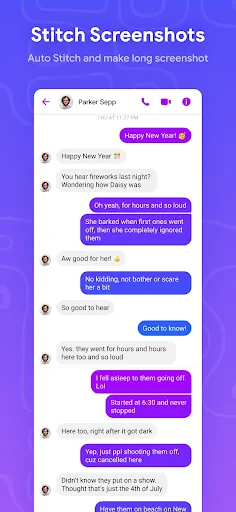
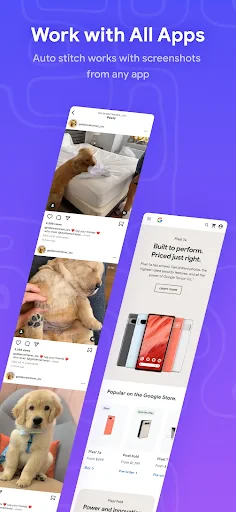
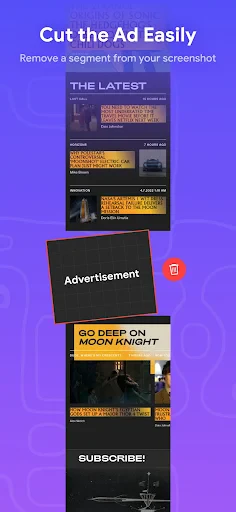
Stitch Photos specializes in creating long, continuous images from individual screenshots. It is ideal for preserving entire WhatsApp chats, Twitter discussions, or webpage content. While some devices offer basic scrolling capture, this app delivers superior control and a more polished final result.
User Interface and Design
The app features a clean, user-friendly interface that prioritizes simplicity. Navigation is straightforward, with clear prompts that guide you from start to finish. This intuitive design ensures a smooth experience for users of all technical levels.
Key Features and Tools
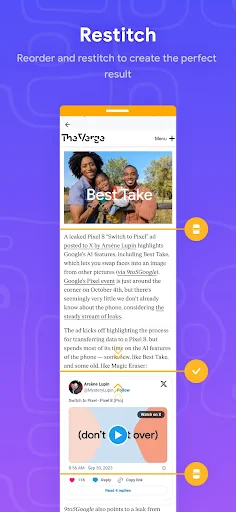
A standout feature is the auto-stitch function, which intelligently aligns and merges your screenshots automatically. For precise customization, manual editing tools allow you to fine-tune the alignment. The app also includes annotation options, letting you highlight text or add notes before sharing or saving your completed image directly to your gallery or social platforms.
Performance and Reliability
Stitch Photos performs efficiently, processing and merging images quickly while maintaining high output quality. The stitched results are consistently seamless, free of visible gaps or distortions. On rare occasions, processing very lengthy images may cause a brief delay, but this does not significantly impact the overall reliable performance.
Conclusion
In summary, Stitch Photos: Long Screenshot is a robust and practical application for creating long-form screenshots. It streamlines the process with powerful features and reliable output. For anyone regularly needing to document extended digital content, this app is a highly recommended solution.
Consider downloading Stitch Photos to effortlessly capture and combine your screenshots. It is a valuable addition for both personal and professional use.
Pros
- Allows seamless stitching of multiple screenshots.
- User-friendly interface with easy navigation.
- Supports high-resolution images without quality loss.
- Fast processing time for quick results.
- No intrusive ads during use.
Cons
- Limited editing tools available.
- Occasional crashes on older devices.
- Requires access to media files.
- Free version has watermarks.
- No cloud integration for backups.
Frequently Asked Questions
What is Stitch Photos: Long Screenshot and how does it work?
Stitch Photos: Long Screenshot is a user-friendly application designed to help you capture and stitch together multiple screenshots or images into a single seamless picture. This app is particularly useful for creating long screenshots of chat conversations, web pages, or any other content that exceeds your screen size. Simply upload your images, and the app will automatically align and merge them for a flawless result.
Is Stitch Photos: Long Screenshot available for both Android and iOS?
Yes, Stitch Photos: Long Screenshot is available for both Android and iOS platforms. You can download it from the Google Play Store for Android devices or the Apple App Store for iOS devices. The app is optimized to provide a smooth user experience on both operating systems, ensuring that all users can easily stitch their photos without any hassle.
Does Stitch Photos: Long Screenshot require an internet connection to function?
No, Stitch Photos: Long Screenshot does not require an active internet connection to function. The app processes all images locally on your device, ensuring your privacy and quick processing times. This makes it convenient to use the app anywhere, whether you're on a flight, in a remote area, or simply without internet access.
Are there any in-app purchases or subscription fees for Stitch Photos: Long Screenshot?
Stitch Photos: Long Screenshot offers both a free version and a premium version. The free version includes basic features that are sufficient for most users. However, to access advanced features such as unlimited stitching, watermark removal, and enhanced editing tools, you can opt for a one-time purchase or a subscription plan that suits your needs.
How user-friendly is Stitch Photos: Long Screenshot for beginners?
Stitch Photos: Long Screenshot is designed with a simple and intuitive interface, making it extremely user-friendly for beginners. The app provides step-by-step guidance and helpful tips to assist you in creating perfect stitched images. With its easy-to-navigate design, even users new to photo editing can quickly learn to use the app efficiently and effectively.
Technical Info
Recommended For You

Chevron

CL theme V1

Bible Homescreen - Read Now
Housecall Pro

AUTODOC: buy car parts online

Mens Hairstyles And Haircuts

Autotrader: Shop Cars For Sale

EVgo - Fast EV Charging

Face Shape - Pretty Scale

Mirror App - Makeup Mirror

Christmas Wallpaper

PSA | Card Grading Service

Skincare Routine

ExtraMile Rewards®

MediBang Paint:Draw Art, Comic

Vagaro Pro

Clipboard

DreamPic - AI Image Generator

Invoice2go: Easy Invoice Maker

eBird by Cornell Lab

Flowt Wear

Paycor Mobile

Dictionary.com: English Words