Infocar - OBD2 ELM Scanner
Auto & Vehicles · Infocar OBD2 Scanner Diagnose Car Issues For Drivers
Screenshots
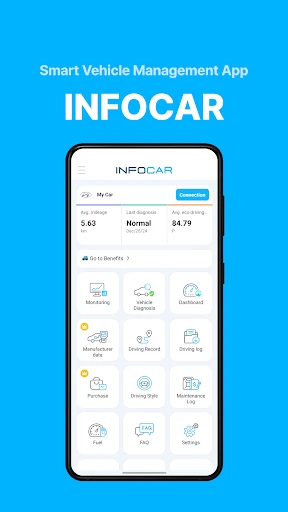
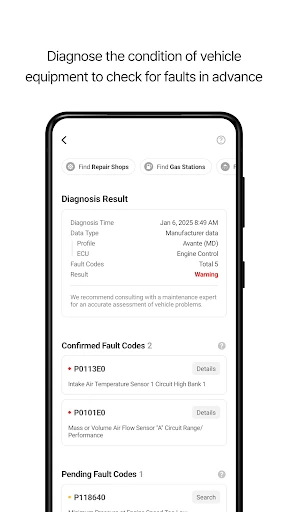
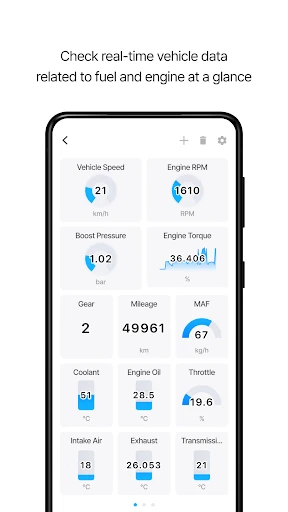
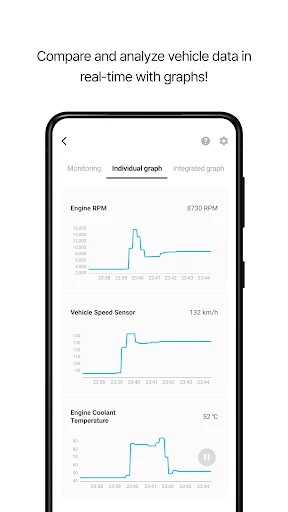
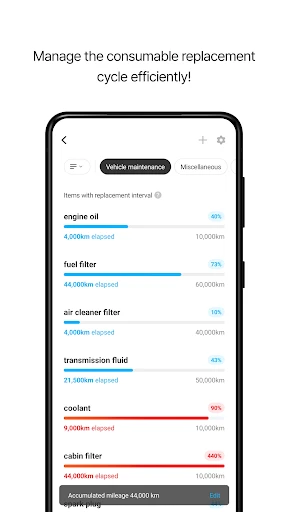
Ever wished you could ask your car what's wrong when it starts having problems? Infocar - OBD2 ELM Scanner makes that possible, acting like a personal mechanic in your pocket to diagnose your vehicle with a few smartphone taps.
Setting Up Your Infocar Scanner
Getting started is straightforward. The Infocar app is available on Android and iOS. Simply download it, pair with a readily available OBD2 ELM device, and you're ready to go. The intuitive interface means no technical expertise is required.
Exploring the App's Capabilities
After connecting, the app provides deep automotive insights. It reads diagnostic trouble codes, delivers real-time performance data, and suggests potential fixes. The customizable real-time dashboard is a standout, allowing you to monitor metrics like speed, fuel economy, and engine RPM.
A particularly useful feature is trip recording, ideal for monitoring driving habits or calculating long-term fuel efficiency. Data is presented in clear graphs and charts for easy tracking and informed decision-making.
Assessing Design and Usability
The app features a sleek, modern design free of clutter and intrusive ads. Navigation is smooth and reliable, reflecting a well-considered user experience. The core functionality is free, with reasonably priced premium features available for enhanced value.
Final Thoughts on Infocar
For car enthusiasts or anyone monitoring their vehicle's health, Infocar - OBD2 ELM Scanner is an essential tool. It combines convenience, reliability, and powerful features to simplify car diagnostics. The peace of mind it provides is invaluable. Try it out—you won't regret it.
Pros
- User-friendly interface for all users.
- Comprehensive car diagnostics provided.
- Real-time data monitoring available.
- Compatible with most car models.
- Detailed vehicle health reports.
Cons
- Requires OBD2 adapter for use.
- Limited features in free version.
- Can drain phone battery quickly.
- Data updates may be slow at times.
- Some features require internet.
Frequently Asked Questions
What is Infocar - OBD2 ELM Scanner used for?
Infocar - OBD2 ELM Scanner is a powerful diagnostic tool designed for car enthusiasts and mechanics. It connects to a vehicle's onboard diagnostic system via an OBD2 adapter, allowing users to monitor real-time car performance metrics, diagnose engine issues, and access a wide array of vehicle information directly from their smartphone.
Is Infocar - OBD2 ELM Scanner compatible with all cars?
While Infocar - OBD2 ELM Scanner is compatible with most vehicles manufactured after 1996, which usually support the OBD2 protocol, it's important to check if your specific car model is supported. Compatibility can vary based on the vehicle's make, model, and year. Users should verify the support list provided by the app or consult their vehicle's manual.
Do I need any additional equipment to use Infocar - OBD2 ELM Scanner?
Yes, to use Infocar - OBD2 ELM Scanner, you will need an OBD2 adapter. This adapter plugs into the vehicle's OBD2 port, which is usually located under the dashboard. The adapter communicates with the app via Bluetooth or Wi-Fi, allowing you to use your smartphone to access vehicle data and diagnostics.
How user-friendly is Infocar - OBD2 ELM Scanner for beginners?
Infocar - OBD2 ELM Scanner is designed with an intuitive interface that is user-friendly for both beginners and experienced users. It offers clear instructions and easy-to-navigate menus that help users quickly learn how to perform diagnostics and interpret vehicle data without requiring prior automotive knowledge.
Does Infocar - OBD2 ELM Scanner require an internet connection to function?
Infocar - OBD2 ELM Scanner primarily relies on the Bluetooth or Wi-Fi connection between your smartphone and the OBD2 adapter, so it does not require an internet connection for basic functionalities. However, for features like app updates or accessing additional resources, an internet connection may be necessary.
Technical Info
Recommended For You

Our Daily Bread

Remodel AI - Home Renovation

ReadAnywhere

네이버 - NAVER

Dictionary - Merriam-Webster

StyleSeat: Book Hair & Beauty

Logo Maker : Logo Creator

PrinterShare Mobile Print

PSWaves Live Wallpapers
Car Launcher Pro

AI Logo Generator, Logo Maker

Quran for Android

ADP Mobile Solutions

PixShift: BackGround Changer

Resume Builder - CV Maker

Freelancer: Hire & Find Jobs

Jobber: Field Service Software

Bible Homescreen - Read Now

Print Photo - Print to Size

Rosa Mystica

Drawing Pad Pro - Sketchpad

Logo Master - Design & Maker

HD Camera for Android