MobiOffice: Word, Sheets, PDF
Business · Mobile Office Suite For Professionals And Students
Screenshots


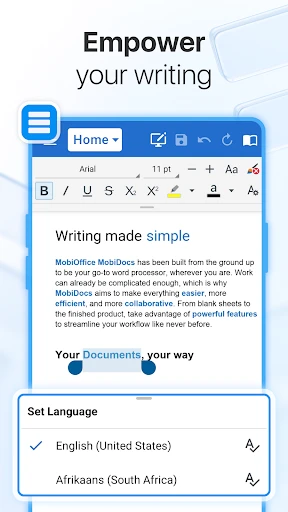


MobiOffice: Your Comprehensive Mobile Document Solution
For anyone seeking to streamline their digital workflow, MobiOffice presents a compelling all-in-one application. This powerful suite consolidates essential document, spreadsheet, and PDF tools into a single mobile platform, designed to meet the demands of students, professionals, and organized individuals alike.
Your Portable Office Suite
MobiOffice effectively functions as a complete office setup within your smartphone. It integrates robust Word processing, Sheets functionality, and PDF management capabilities, enabling you to create, edit, and review work directly from your mobile device. This eliminates the constant need for a laptop, offering significant convenience for on-the-go tasks.
The application prioritizes an accessible and straightforward user experience. Its layout is logically designed for immediate navigation, ensuring efficiency for users of all technical skill levels. Performance is consistently smooth and reliable, even on devices with older hardware specifications.
Powerful, Productivity-Focused Features
A key strength of MobiOffice is its seamless cross-platform operation. Your documents sync effortlessly across your devices, and integrated cloud storage support provides vital protection against data loss. This guarantees your work is always current and accessible, regardless of your location.
The app further enhances productivity with real-time collaborative tools. You can effortlessly share documents with peers or colleagues, permitting them to view or edit content simultaneously. This feature handles multiple contributors reliably, making group projects and team feedback sessions remarkably fluid.
Built with Your Security in Mind
MobiOffice places a strong emphasis on safeguarding your data. The suite incorporates advanced security protocols, including end-to-end encryption, to ensure your sensitive documents and personal information remain confidential and secure from unauthorized access.
Overall Impression
In summary, MobiOffice stands out as a formidable and versatile mobile productivity tool. It successfully delivers the core utilities of a traditional office suite in a streamlined, mobile-friendly format, capable of handling a wide array of document creation and management tasks.
For those in need of a reliable, all-encompassing document application for mobile use, MobiOffice is certainly worth considering. It transforms your smartphone into a potent hub for personal and professional productivity.
Pros
- Supports multiple file formats.
- User-friendly interface.
- Integrated cloud storage.
- Offline mode available.
- Regular updates.
Cons
- Limited free version features.
- Occasional ads in free version.
- Some features require subscription.
- Can be slow on older devices.
- Limited customer support.
Frequently Asked Questions
What features does MobiOffice offer compared to other office apps?
MobiOffice stands out by providing a comprehensive suite that includes word processing, spreadsheet management, and PDF viewing and editing all in one app. Unlike many other office apps that focus on a single type of document, MobiOffice offers seamless integration among documents, allowing you to easily switch between editing a Word document, working on a spreadsheet, or annotating a PDF without needing to switch apps.
Is MobiOffice compatible with Microsoft Office files?
Yes, MobiOffice is designed to be fully compatible with Microsoft Office files, including Word (DOC, DOCX), Excel (XLS, XLSX), and PowerPoint (PPT, PPTX). This ensures that users can open, edit, and save documents in formats that are widely used and recognized, making collaboration with users of other office software smooth and hassle-free.
Can I use MobiOffice offline, or do I need an internet connection?
One of the advantages of MobiOffice is its ability to function offline. Users can create, edit, and save documents without needing an internet connection. However, certain features, such as cloud storage sync and online collaboration, will require an internet connection to function. This offline capability ensures productivity even when you're on the go or in areas with limited connectivity.
What platforms is MobiOffice available on, and does it sync across devices?
MobiOffice is available on both Android and iOS platforms, making it accessible to a wide range of mobile users. Additionally, it offers cross-device synchronization through cloud services, allowing you to access and edit your documents from multiple devices seamlessly. This feature is particularly beneficial for users who switch between different devices throughout their day.
Are there any subscription fees or in-app purchases for MobiOffice?
While MobiOffice offers a free version with basic features, there is a premium subscription available that unlocks additional features such as advanced editing tools, extra cloud storage, and priority customer support. Users should review the app’s pricing details and consider their needs to decide whether the free version suffices or if the premium plan offers worthwhile enhancements.
Technical Info
Recommended For You

Spirit Fanfiction and Stories

PhiApp

CL Theme Card

NIV Bible version, Offline app

Photo Editor - Retouch Photos

AR Draw Sketch & Paint

Face Shape - Pretty Scale

Mirror Study Bible

AR Drawing: Sketch, Art, Trace

PayByPhone

Chevron

Passport Photo: ID Photo Print

ThinkDiag+

Kobo | eBooks & Audiobooks

Bible For Women-Holy Bible App

AppBarber: Cliente

Color Analysis - Dressika

Workday

Garmin Drive™

Genius Scan - PDF Scanner

Cross Stitch Thread Organizer

Animagic: Anime Art Generator

ArtistAI: AI Photo Generator