Logo Maker : Graphic Designer
Business · Logo Maker Create Professional Designs Easily
Screenshots



Logo Maker: Graphic Designer
Have you ever needed a professional logo but found graphic design tools intimidating? Meet Logo Maker: Graphic Designer. This app puts powerful design capability right at your fingertips, enabling you to create striking logos quickly and easily. Discover why this tool is essential for entrepreneurs, creators, and anyone with a vision.
An Intuitive Design Companion
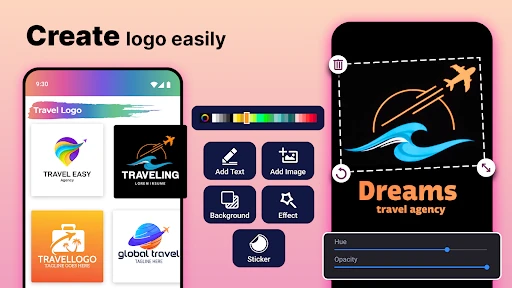
The application features a clean, user-friendly interface that requires no prior design knowledge. Upon launching, you are presented with a wide array of professionally crafted templates. No matter your style—from sleek and modern to bold and intricate—you will find a perfect starting point for your project.
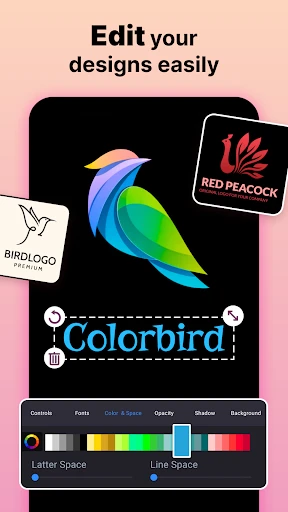
True power lies in the deep customization suite. Adjust every detail, including colors, fonts, and graphical elements. Experimenting with combinations is both simple and enjoyable, allowing anyone to produce a polished, business-ready logo through an intuitive, creative process.
Features to Fuel Your Creativity
Logo Maker does more than combine text and shapes. It provides advanced tools for genuine originality. The layering system, for instance, allows you to build depth and sophistication by stacking design components. An extensive, ever-growing library of icons, typefaces, and backgrounds ensures your creation is uniquely yours.
The app also excels in output flexibility. Download your final logo in multiple file formats, ensuring optimal quality for any use case—be it your website, social media, business cards, or promotional materials.
The Standout Advantages
What distinguishes this app in a crowded market? Its exceptional accessibility tops the list. The guided design experience empowers complete beginners while offering the depth that aspiring designers seek. Regular updates continuously refresh the toolset with new assets and contemporary design trends.
Consider also its remarkable value. Professional design services can be prohibitively expensive. This app delivers high-quality results at a fraction of the cost, making it an ideal solution for startups, small businesses, and personal passion projects.
In summary, Logo Maker: Graphic Designer is a comprehensive and adaptable tool for logo creation. It combines ease of use with robust features, serving both novices and experienced users. If you aim to craft a logo that captures attention and communicates your brand's essence, this app is your ideal starting point.
Pros
- User-friendly interface for quick design.
- Wide variety of templates available.
- High-quality graphics and fonts.
- Customizable design elements.
- Supports export in multiple formats.
Cons
- Limited free features.
- Occasional ads disrupt workflow.
- Requires internet for full functionality.
- Some templates feel generic.
- No collaboration features.
Frequently Asked Questions
What is Logo Maker: Graphic Designer and what does it offer?
Logo Maker: Graphic Designer is a mobile application designed to help users create professional logos and graphics effortlessly. It offers a wide range of customizable templates, icons, and fonts to suit various business needs. Whether you're a startup owner or a graphic designer, this app provides tools to craft visually appealing logos without requiring extensive design skills.
Is Logo Maker: Graphic Designer user-friendly for beginners?
Yes, Logo Maker: Graphic Designer is designed with user-friendliness in mind, making it suitable for beginners. The intuitive interface, alongside step-by-step guides, ensures that users can easily navigate through the app. With drag-and-drop functionality and a variety of pre-made templates, even those with no prior design experience can create stunning logos quickly.
What customization options are available in Logo Maker: Graphic Designer?
Logo Maker: Graphic Designer offers extensive customization options to cater to diverse design preferences. Users can choose from a plethora of templates, adjust colors, fonts, and sizes, and add unique icons or text. This level of customization allows users to create logos that truly reflect their brand identity, making each design unique and personalized.
Does Logo Maker: Graphic Designer require an internet connection to function?
Logo Maker: Graphic Designer primarily functions offline, allowing users to design logos without needing a constant internet connection. However, some features, such as accessing additional templates or saving designs to cloud storage, may require internet access. This ensures flexibility, enabling users to work on their designs anytime and anywhere.
Are there any costs associated with using Logo Maker: Graphic Designer?
Logo Maker: Graphic Designer offers a freemium model, providing basic design tools and templates for free. However, to unlock premium features, such as exclusive templates, advanced customization options, and ad-free experience, users may need to purchase a subscription. This allows users to explore the app's functionalities before deciding on a paid plan.
Technical Info
Recommended For You
Tattoo Design & Tattoo Maker

Remodel AI - Home Renovation

Guide For Stardew

King James Bible - KJV Offline

GoodNovel - Web Novel, Fiction

3D Modeling App: Sculpt & Draw

Coinoscope: Coin identifier

Holy Quran - Deeper journey

Floor Plan Creator

Microsoft Designer

Sky Tonight - Star Gazer Guide

Wikipedia

PrinterShare Premium Key

Librera PRO - Book reader

IPSY: Personalized Beauty

ComEd

King James Bible - Verse+Audio

ExtraMile Rewards®

Drawing Pad Pro - Sketchpad

Face Beauty Makeup Camera-Self

القرآن الكريم كامل بدون انترنت

Mary Kay® Skin Analyzer

Vagaro Pro