
Microsoft Authenticator
Business · Secure Microsoft account sign ins with multifactor authentication
Screenshots


A Reliable Guardian for Your Digital Life: Microsoft Authenticator
If you’ve ever struggled to recall which unique password belongs to which account, you’re not alone. Microsoft Authenticator arrives as a dependable solution to this modern dilemma. After testing it thoroughly, I find it to be an indispensable tool for everyday security.
Setup Could Not Have Been Simpler
Beginning with the app was remarkably straightforward. Available on both major mobile platforms, I downloaded it and completed the setup within minutes. The process involves clear, step-by-step guidance, ideal for users of all technical levels. Simply scanning a QR code from your Microsoft account links everything seamlessly.
An Essential Layer of Added Protection
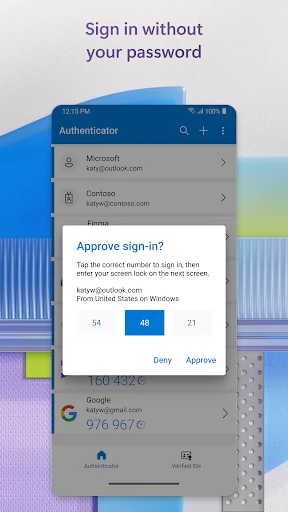
The core function is two-factor authentication (2FA), a critical defense in today’s digital landscape. This app streamlines the process beautifully. Once configured, each login attempt triggers a simple approval request on your phone. This method eliminates the hassle of waiting for and entering codes from texts or emails.
Versatility Beyond the Microsoft Ecosystem
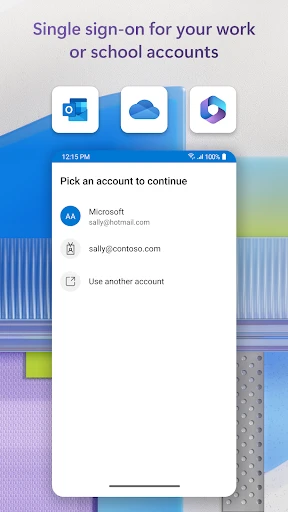
Despite its name, this tool extends far beyond Microsoft services. I successfully integrated accounts from Google, social media, and various other platforms. It acts as a centralized security hub, effortlessly managing credentials for numerous accounts in one secure location.
Intuitive and Streamlined Design
The application boasts a clean, organized, and intuitive interface. Navigation is logical and effortless, with a clutter-free layout that presents information clearly. This thoughtful design ensures accessibility for everyone, regardless of their technical proficiency.
Robust Recovery for Peace of Mind
A standout feature is the cloud backup and sync capability. The fear of losing your phone no longer means losing access to your authentication setup. With backup enabled, your account details are securely stored and can be easily recovered on a new device, much like a safety net for your digital access.
Final Verdict: A Must-Have for Modern Security
In conclusion, Microsoft Authenticator proves to be a vigilant and adaptable protector for your online presence. It combines strong security with notable convenience, making enhanced protection accessible to all. Whether you're highly security-conscious or simply seeking a smoother login experience, this app is a valuable addition to your digital toolkit.
Pros
- Easy setup and intuitive interface.
- Supports multi-factor authentication seamlessly.
- Integrates well with Microsoft services.
- Quick access to passwords and accounts.
- Strong security measures in place.
Cons
- Limited offline capabilities.
- Occasional sync issues reported.
- Requires Microsoft account for full features.
- No customization for notifications.
- Can be overwhelming for new users.
Frequently Asked Questions
What is Microsoft Authenticator and how does it work?
Microsoft Authenticator is a security app that provides two-factor authentication (2FA) to help protect your accounts. When you log in to an account, the app will send a notification to your mobile device to verify your identity. It supports multi-factor authentication, allowing you to log in securely without using a password.
Is Microsoft Authenticator free to use?
Yes, Microsoft Authenticator is completely free to download and use. There are no hidden fees or premium features. The app is available for both Android and iOS devices, and you can easily find it on the Google Play Store or the Apple App Store.
Can I use Microsoft Authenticator with non-Microsoft accounts?
Absolutely! Microsoft Authenticator supports a wide range of accounts, not just Microsoft ones. You can use it with Google, Facebook, Amazon, and many other services that offer two-factor authentication. This makes it a versatile tool for enhancing your online security across various platforms.
How secure is Microsoft Authenticator?
Microsoft Authenticator is highly secure, utilizing industry-standard security measures. It offers features like passwordless sign-in, biometric verification, and encrypted cloud backup. However, users must ensure their mobile device is secure and updated to maintain optimal protection while using the app.
What if I lose my phone? Can I still access my accounts?
If you lose your phone, you can still access your accounts by using the recovery options provided by each service. Microsoft Authenticator also offers a cloud backup feature, allowing you to recover your account information on a new device. It’s crucial to set up these recovery options in advance for seamless access to your accounts.
Technical Info
Recommended For You

Bible For Women-Holy Bible App

VistaCreate: Graphic Design

E-PASS Toll App

FotoFusion - Editor Photo

AlphaNovel — Books & Stories

Passport Photo: ID Photo Print

Gocrypto: Crypto Trading

iScanner - PDF Scanner App

Blue Yonder Workforce

Pocket Novel

BimmerCode for BMW and MINI

Mirror - Makeup and Shaving

FX File Explorer: Plus License

Librera PRO - Book reader

FaxCover Pro Create Cover Page

Autolink

Advent Magnificat 2024

King James Bible Study KJV

Coloring games: speed drawing

Audible: Audio Entertainment

Chirp Audiobooks

PSWaves Live Wallpapers

BeautifyX - AI Makeover Studio
