Jobber: Field Service Software
Business · Jobber manages field service jobs scheduling invoicing and client communication
Screenshots

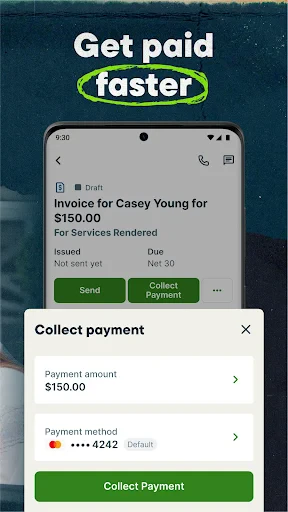

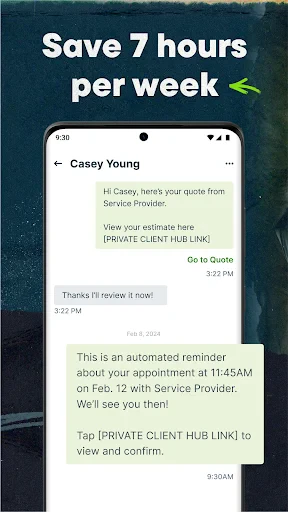

Streamline Your Field Operations with Jobber
For professionals seeking to simplify workflows and boost productivity, Jobber: Field Service Software offers a powerful solution. Available on Android and iOS, this app is an essential tool for any business that operates on-site.
Jobber’s core strength is consolidating your entire business into one unified platform. It seamlessly integrates scheduling, invoicing, and client management, eliminating the inefficiency of juggling multiple systems. The visual scheduling tool is particularly effective, providing an at-a-glance view of your day and allowing for easy adjustments.
The application excels with its comprehensive client management system. It centralizes all customer data, tracks communication history, and enables automated follow-ups. Instant access to a client’s full record fosters more personalized service, while integrations with major accounting software streamline the billing process.
Jobber truly shines through its robust mobile functionality. The on-the-go app ensures your team has critical job details, can update statuses, and collect digital signatures from anywhere. Offline mode maintains productivity in low-connectivity areas, and built-in GPS routing optimizes travel to save both time and fuel—a game-changing feature for field efficiency.
Flexibility is fundamental, and Jobber is designed to adapt to your business. Customizable data fields and workflows allow you to tailor the software to your specific service model, whether you're in HVAC, cleaning, landscaping, or beyond, creating a bespoke operational tool.
In summary, Jobber: Field Service Software is a comprehensive system designed to drive efficiency at every level. It scales to support both small businesses and larger teams, smoothing operations from scheduling to payment. By handling the details of field service management, Jobber empowers you to focus on growth. If disorganization is holding you back, Jobber may be the clarity and control you need.
Pros
- User-friendly interface simplifies tasks.
- Seamless scheduling and dispatching.
- Comprehensive client management tool.
- Efficient invoicing and payment collection.
- Integration with various third-party apps.
Cons
- Limited offline functionality.
- Higher cost than some competitors.
- Occasional syncing issues reported.
- Not ideal for very large enterprises.
- Customization options are somewhat limited.
Frequently Asked Questions
What is Jobber: Field Service Software used for?
Jobber is primarily designed for service-based businesses looking to streamline their operations. It helps in scheduling jobs, managing customer relationships, tracking work progress, and invoicing clients. Ideal for industries such as landscaping, cleaning, and plumbing, Jobber provides tools that enhance efficiency and improve customer satisfaction by organizing all aspects of field service management.
Is Jobber suitable for small businesses?
Yes, Jobber is highly suitable for small businesses, especially those in the service sector. It offers scalable solutions that cater to the unique needs of small enterprises, including user-friendly features for scheduling, invoicing, and customer management. With its intuitive design, Jobber helps small businesses operate more efficiently without the need for extensive technical knowledge.
Can Jobber integrate with other software tools?
Jobber offers integration capabilities with several popular software tools, enhancing its functionality. It can connect with accounting software like QuickBooks, payment processors like Stripe, and other productivity tools. This integration flexibility allows businesses to create a seamless workflow across different platforms, ensuring data consistency and operational efficiency.
What platforms is Jobber available on?
Jobber is available on multiple platforms to accommodate the needs of field service businesses. It offers applications for both Android and iOS devices, allowing field workers to access job details on the go. Additionally, Jobber provides a web-based platform accessible through any browser, ensuring that teams can stay connected whether in the field or at the office.
Does Jobber offer a free trial or demo?
Yes, Jobber provides potential users with a free trial period. This allows businesses to explore the features and benefits of the software before committing to a subscription. During the trial, users can experience the full range of tools and determine how well Jobber fits their operational needs, making an informed decision about its utility and value.
Technical Info
Recommended For You

Mirror - Fullscreen Mirror App

OBD Scanner ELM327: GaragePro

Beauty Camera: Sweet Camera

MySubaru

Tarteel ترتيل - Memorize Quran

ReadAnywhere

Workday

10-4 by WEX

Draw Cartoon - AR Drawing App

Auto Sync for Android/Car Play

Arch - AI Home Design

Easy Pose - 3D pose making app

FotoFusion - Editor Photo

GIMP

VSD Viewer for Visio Drawings

Easy Hairstyles for Girls

Mary Kay® Skin Analyzer

AR Drawing: Paint & Sketch App

Wikipedia

Quran for Android

CARFAX Car Care App

Pixel Studio PRO: editor

EOBD Facile: OBD 2 Car Scanner