
Thrift Savings Plan
Business · TSP Retirement Savings For US Government Employees
Screenshots

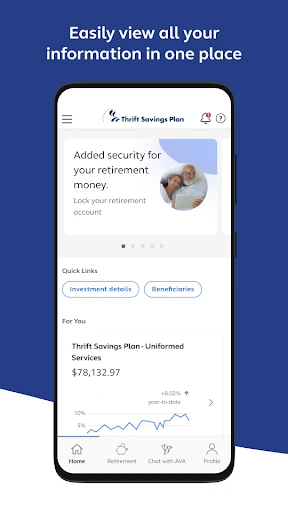
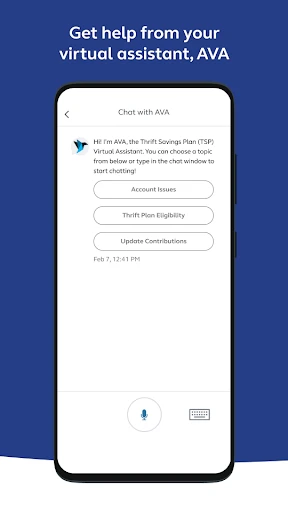
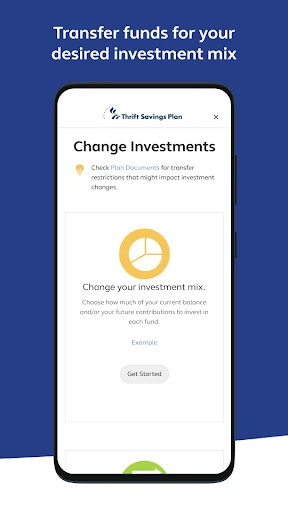
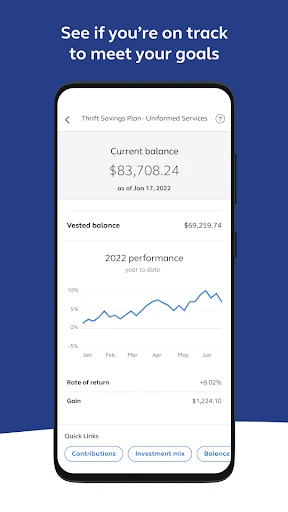
Navigating Your Retirement with the TSP Mobile App
For anyone invested in the Thrift Savings Plan, having direct access to your account is essential. The official TSP mobile app delivers precisely that, putting comprehensive retirement management directly into the palm of your hand. Here’s a closer look at what it offers.
Installation and Initial Setup
The application is readily available for download on both iOS and Android platforms via their respective app stores. Installation is simple, and logging in requires your standard TSP account credentials. The setup process is clearly guided, featuring a clean and intuitive interface that accommodates users of all technical levels.
Core Features and Functionality
This app provides a full suite of account management tools. You can review your current balance, monitor investment performance, and adjust your contribution allocations directly from your device. Access to real-time fund prices and interest rates is also included, allowing for informed decision-making at any time.
Customizable account alerts and notifications help you stay updated on important activity. Security is reinforced through multi-factor authentication, ensuring your financial data remains protected while you manage your retirement savings on the go.
User Experience and Support
The app prioritizes a user-friendly experience with straightforward navigation and a clear visual design. An integrated help section provides immediate assistance for common questions. Should you need further support, customer service is accessible directly through the application.
It is worth noting that application speed can occasionally slow during periods of high user traffic. However, this is a minor inconvenience relative to the overall convenience the app provides for routine account management.
Final Assessment
In summary, the TSP mobile app is a robust and secure tool for managing your Thrift Savings Plan investments. It successfully combines essential features with operational convenience, making it a valuable resource for both new and experienced participants aiming to actively oversee their retirement future.
Pros
- User-friendly interface for easy navigation.
- Comprehensive retirement planning tools.
- Low administrative fees compared to peers.
- Wide range of investment options.
- Secure access with robust encryption.
Cons
- Limited customer service availability.
- Mobile app lacks advanced features.
- No direct debit from external accounts.
- Limited educational resources in-app.
- Occasional login issues reported by users.
Frequently Asked Questions
What is the Thrift Savings Plan (TSP) and who can use it?
The Thrift Savings Plan (TSP) is a retirement savings and investment plan for federal employees and members of the uniformed services, including the Ready Reserve. It's similar to private sector 401(k) plans. TSP is designed to provide retirement income and encourages participants to save for their future. It's available exclusively to federal employees and military personnel.
How do I access my Thrift Savings Plan account through the app?
To access your TSP account through the app, you need to download the official TSP app from your device's app store. Once installed, log in using your TSP account credentials. Ensure you have registered for online access on the TSP website first. The app provides easy access to manage your contributions, track your investment performance, and more.
What features are available in the Thrift Savings Plan app?
The TSP app offers a range of features, including the ability to view your account balance, manage your contributions, and change your investment allocations. You can also track the performance of your investments, receive important notifications about your account, and access educational resources to help you make informed decisions about your retirement savings.
Is my personal information safe on the Thrift Savings Plan app?
Yes, the security of your personal information is a top priority for the Thrift Savings Plan. The app employs advanced security measures, including encryption and secure login processes, to protect your data. Regular updates and security audits are conducted to ensure the highest level of protection against unauthorized access and data breaches.
Are there any fees associated with using the Thrift Savings Plan app?
There are no additional fees specifically for using the Thrift Savings Plan app. However, be aware that standard data rates from your mobile service provider may apply when downloading and using the app. The TSP itself is known for having low administrative and investment fees, which are deducted from your account balance, making it a cost-effective retirement savings option.
Technical Info
Recommended For You

DIKIDI Online

RepairSolutions2

Paint

Holy Bible, KJV Bible + Audio

ArtRage Vitae Mobile Painting

Bible-Daily Bible Verse

Smartsheet: Projects & Teams

Camouflage Doors Mod for MCPE

Roadie Driver

Rosa Mystica

Diamond Painting by Number

PDF Scanner app - TapScanner

Vault - Hide Pics, App Lock

Adobe Capture: Illustrator,Ps

VIN Check Report for Used Cars

Trace Drawing-Sketch and Paint

AI Drawing : Trace & Sketch

Face scan - How old do I look

Bible Study - Verse & Audio

AR Drawing Sketch Paint

Storytel - Audiobooks & Books

IPSY: Personalized Beauty

LogMeIn Rescue Customer
