CamToPlan
Business · Measure Rooms Create Floor Plans Instantly
Screenshots

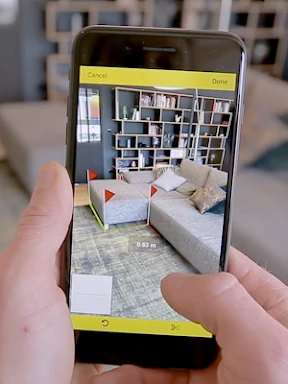
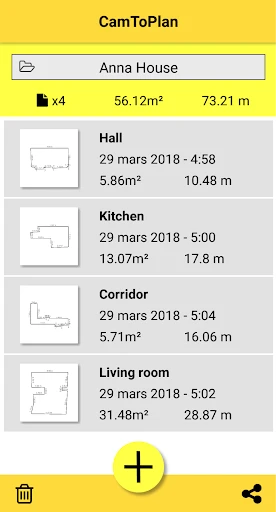

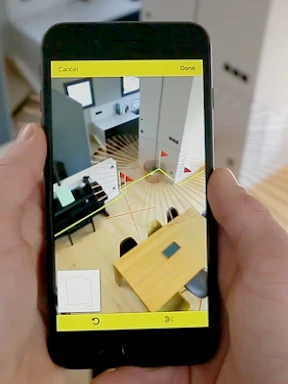
Introducing CamToPlan: Your Augmented Reality Measurement Solution
Ever found yourself needing to take a measurement without a tape measure handy? Whether planning a room layout or determining furniture fit, CamToPlan solves this problem. This innovative app transforms your smartphone into a virtual measuring tool by harnessing camera-based augmented reality. Discover how this application can revolutionize your approach to spatial measurement.
Transform Your Smartphone into a Precision Tool
Leveraging your device’s camera and augmented reality, CamToPlan calculates distances and area dimensions. It acts as a digital tape measure, capable of sizing objects from tabletops to entire walls. Simply aim your camera at the target, and the app performs the necessary computations. Offering accuracy within centimeters, it serves as an invaluable asset for DIY enthusiasts and professionals in industries like interior design and contracting.
Intuitive Design for Immediate Use
CamToPlan’s standout quality is its exceptional ease of use. No technical expertise is required. Upon installation, a brief guide demonstrates the straightforward process. The interface is clean and intuitive, allowing you to begin measuring instantly without a learning curve. Its versatility supports horizontal, vertical, and diagonal measurements, adapting to a wide array of projects and scenarios.
Understanding Its Measurement Accuracy
While CamToPlan delivers reliable results, its precision can be influenced by environmental factors. Optimal performance requires good lighting, and reflective or transparent surfaces may introduce minor inaccuracies. For typical household applications, it performs excellently. However, for mission-critical tasks demanding exact figures, verification with a physical measuring tool is recommended.
Practical Applications Beyond Home Projects
Initially a DIY aid, CamToPlan proves useful in diverse situations. Imagine verifying furniture dimensions in a store or assessing cargo space. Real estate agents can swiftly provide room sizes to clients. This app functions as a versatile digital multi-tool for measurement, offering convenience and utility directly from your mobile device.
Final Thoughts
In an era where technology seamlessly blends with physical tasks, CamToPlan exemplifies the practical power of augmented reality. Ideal for home improvers, professionals needing quick estimates, or tech enthusiasts, this app is a compelling download. It combines simplicity, adaptability, and innovative technology to streamline everyday measurements. Consider trying CamToPlan to experience a smarter way to measure your world.
Pros
- Accurate AR measurements for both horizontal and vertical surfaces.
- User-friendly interface makes it easy to use for anyone.
- Supports exporting data in multiple formats for convenience.
- Works well in various lighting conditions.
- No need for additional hardware
Cons
- Requires a well-lit environment for best results.
- May not work on older devices with outdated AR support.
- Occasional calibration issues in complex spaces.
- Free version has limited features compared to premium.
- Battery consumption is higher during extended use.
Frequently Asked Questions
What is CamToPlan and how does it work?
CamToPlan is an innovative app that uses augmented reality (AR) to measure distances and create floor plans with your smartphone or tablet. Simply point your device's camera at the area you wish to measure, and the app will automatically calculate distances and angles using AR technology. This makes it a convenient tool for professionals and DIY enthusiasts alike.
Is CamToPlan accurate enough for professional use?
CamToPlan is designed to offer high accuracy by leveraging the latest AR technology. While it's suitable for many professional applications, the accuracy can depend on factors like lighting conditions, device quality, and user handling. For tasks requiring precise measurements, it's recommended to double-check results with traditional tools as a precaution.
Can I use CamToPlan for creating floor plans of large areas?
Yes, CamToPlan can be used to create floor plans for both small and large areas. The app allows users to map out entire rooms or even larger spaces by moving around and capturing different sections. However, for extremely large areas, ensure your device's battery is sufficiently charged, as extended use may drain power quickly.
What devices are compatible with CamToPlan?
CamToPlan is compatible with most modern smartphones and tablets that support augmented reality capabilities. This typically includes devices running on iOS 11 or later and Android devices with ARCore support. It's important to check the app store listing or the official website for specific device requirements before downloading.
Does CamToPlan require an internet connection to function?
CamToPlan primarily uses your device's camera and AR capabilities, so it doesn't require an internet connection for measuring and creating floor plans. However, an internet connection may be necessary for initial app download, updates, or accessing certain features like cloud storage or sharing options. Always ensure to check the app's requirements for any additional connectivity needs.
Technical Info
Recommended For You

Wonolo

Shiftsmart - Find Work

Birthday Invitation Card Maker

Protection 360™

Moonstories

Car Engine Sounds - Gas Pedal

WhatColors: AI Color Analysis

Public Storage

Grubhub for Drivers

Google Chat

Quran for Android

Enphase Enlighten

Android Auto

Pixilart - Make Pixel Art

Driving Instructor-Theory Test

NovelUP — Novel Downloader

Drawing Apps: Draw, Sketch Pad

Outlined Watch Face

NovelBar-Your Reading Haven

Flowbird Parking

MERO - Programări Online

Autowini

OBD Auto Doctor: OBD2 Scanner
