
ePSXe for Android
Arcade · PSX PlayStation Emulator Play Classic Games On Phone
Screenshots
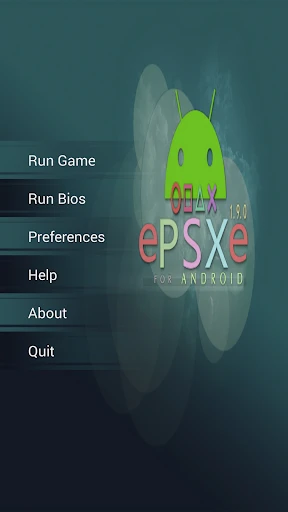

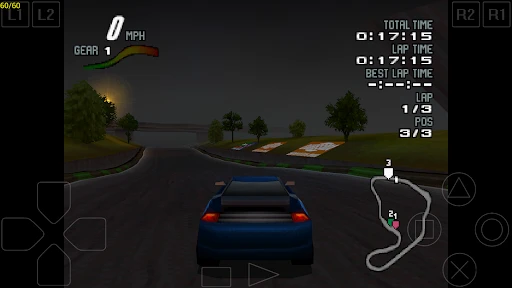

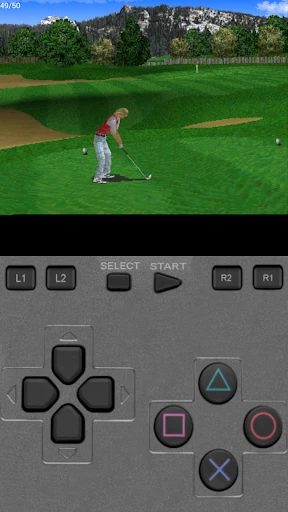
Experience PlayStation Classics on Your Mobile Device
For fans of retro gaming, the ability to play original PlayStation titles on an Android phone is a powerful draw. ePSXe for Android makes this possible, serving as an emulator that delivers a genuine PlayStation feel directly to your smartphone. This exploration will assess whether the app truly honors its storied name.
Nostalgia at First Launch
Starting ePSXe instantly evokes memories of earlier gaming eras. The application installs without complication, allowing gameplay to begin quickly. Its compatibility spans a vast library of PlayStation titles, from high-speed competitions in "Gran Turismo" to epic journeys in "Final Fantasy VII," catering to diverse tastes.
Initial Setup Requirements
While the emulator itself is easy to configure, the process is more involved than installing a typical mobile game. You must provide your own BIOS file and game ROMs, which can be a barrier for newcomers. Overcoming this initial step, however, leads to a reliably functioning system.
Performance and Playability
Game performance is notably strong. Visuals are sharp and audio quality is excellent, closely replicating the console's original output. Games operate smoothly with few interruptions, and the inclusion of a split-screen mode enables shared nostalgic sessions with another player.
Tailoring the Experience
Customization is a key strength of ePSXe. Controls can be adjusted for touchscreen use or paired with a Bluetooth controller. Additional features like graphics filters and support for cheat codes offer further ways to personalize and enhance your playthrough.
Final Verdict
Is ePSXe a worthwhile download? For PlayStation fans, the answer is yes. This app is a direct portal to gaming's past. The setup may require some patience for beginners, but the resulting experience justifies the effort. Whether driven by nostalgia or curiosity for classic games, ePSXe delivers a robust and satisfying platform.
Ultimately, ePSXe for Android successfully captures the essence of the PlayStation. It stands as an effective link between classic gaming and modern technology, letting a new generation enjoy timeless titles. Prepare your game files, and let ePSXe guide your nostalgic return.
Pros
- High compatibility with PlayStation games.
- Supports virtual touchscreen pad.
- External gamepad support for better control.
- Offers customizable controls and settings.
- Fast forward and save state features.
Cons
- Requires BIOS file for setup.
- UI feels outdated and clunky.
- No built-in game library or store.
- Some games may experience slowdowns.
- Limited support for multiplayer.
Frequently Asked Questions
What is ePSXe for Android and what does it do?
ePSXe for Android is a PlayStation emulator that allows users to play their favorite PS1 games on their Android devices. It simulates the PlayStation console environment, enabling you to run games just like on the original hardware. The app supports both smartphones and tablets, providing a seamless gaming experience with high compatibility and speed.
How do I install and set up ePSXe on my Android device?
To install ePSXe, download it from the Google Play Store and follow the on-screen instructions. After installation, you'll need to obtain PlayStation BIOS files and game ROMs, which are not included with the app due to legal reasons. You can transfer these files to your device's storage and load them through the emulator's interface to start playing.
What are the system requirements for running ePSXe on Android?
ePSXe requires an Android device running version 2.3 or higher. Your device should have a decent CPU and GPU to ensure smooth gameplay, especially for graphically intensive games. While it doesn't demand the latest hardware, having a mid-range smartphone or tablet can significantly enhance the performance and visual quality of the games.
Does ePSXe support multiplayer gaming on Android?
Yes, ePSXe supports multiplayer gaming on Android. It offers two-player mode on a single device using split-screen or the option to connect multiple devices via Wi-Fi or Bluetooth. This feature allows you to enjoy classic PlayStation multiplayer games with friends, bringing back the nostalgic gaming experience on modern devices.
Are there any legal issues associated with using ePSXe for Android?
Using ePSXe itself is legal, but legality issues arise with game ROMs and BIOS files. You should only use ROMs and BIOS files that you own or have the legal right to use. Downloading or distributing copyrighted ROMs or BIOS files without permission is illegal and against ePSXe's terms of service. Always ensure you comply with legal requirements to avoid any issues.
Technical Info
Recommended For You

Solitaire Grand Harvest

Solitaire for Seniors Game

Sniper Area: Sniper shooter

Pixel Coloring-Color by number

Gas Station Simulator Tycoon

War Sniper: FPS Shooting Game

Crazy Challenge: Mini Games 3D

Stickman Warriors

Kooply Run: Subway Craft

Color Adventure: Draw the Path

DRAGON BALL Z DOKKAN BATTLE

Creatures of the Deep: Fishing

Sonic Dash 2: Sonic Boom Run

Zachtronics Solitaire

Farkle Dice Roll

Vita Solitaire for Seniors

Gym Heros: Fighting Game

Meme Color Pro:Color by Number

aquapark.io

Slingshot Smash-Shooting Range

Mech Assemble: Zombie Swarm

Sonic The Hedgehog 2 Classic

Eternal Empire: Warrior Eras
