Easy Pose - 3D pose making app
Art & Design · Easy Pose Create Poses For Artists And Animators
Screenshots

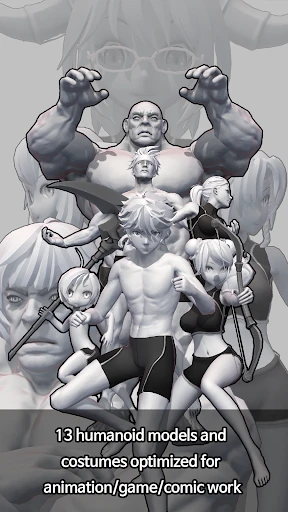
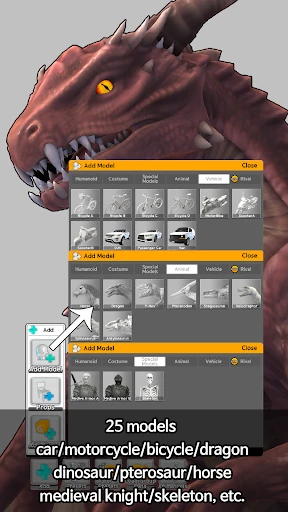
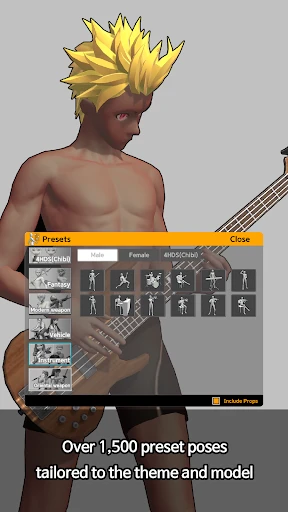

Introducing Easy Pose: Your Digital Mannequin for Art and Animation
Artists and animators, meet your new creative partner. If finding the perfect character pose has ever slowed you down, Easy Pose is the 3D pose-making app designed to solve that. Think of it as a portable digital mannequin, ready to support your sketching process anywhere.
Simple Setup and Intuitive Interface
Getting started is effortless. Easy Pose is available for both Android and iOS, offering wide accessibility. The app features a clean, logical layout so you can focus on creating, not searching for tools. Begin with a library of pre-made poses or dive right into customizing your own.
Full Control Over Your 3D Scene
The app’s power lies in its precise control. Manipulate 3D models with ease—articulate limbs, twist torsos, and examine your pose from every angle. It’s a pocket-sized art studio. You can even populate a scene with multiple figures to craft dynamic character interactions.
Master Light and Shadow with Ease
Elevate your artwork with built-in lighting tools. Adjust the light source to study how shadows define form and volume. This feature provides invaluable insight for accurately rendering light and shadow in your final drawings.
Built for All Skill Levels
Easy Pose welcomes everyone. Beginners can follow step-by-step tutorials, while seasoned artists can leverage advanced tools. The app also fosters a supportive community where you can share ideas and gather inspiration, connecting you with fellow creators.
A Streamlined, Focused Tool
The app excels through its dedicated simplicity. Free from clutter, it delivers on its core promise: enabling quick, frustration-free pose creation. This makes it ideal for everything from quick sketches on the go to serious project work at your desk.
Unlock Your Creative Potential
In summary, Easy Pose is an essential tool for enhancing your art. Whether you doodle, illustrate comics, or animate, this app is a reliable aid. It’s more than a poser; it’s a key to translating your creative visions onto the page with precision and flair.
Ready to Elevate Your Artwork?
If you're aiming to improve your drawings, give Easy Pose a try. It’s the tool you’ll soon wonder how you ever lived without. Happy creating!
Pros
- Intuitive interface for easy navigation.
- Wide range of customizable models.
- Realistic 3D graphics for detailed poses.
- Supports diverse artistic styles.
- Frequent updates with new features.
Cons
- Some features require paid version.
- Might lag on older devices.
- Limited free model options.
- Occasional bugs in 3D rendering.
- Steep learning curve for beginners.
Frequently Asked Questions
What is Easy Pose and what can I use it for?
Easy Pose is a 3D pose making app designed for artists, animators, and illustrators who want to create realistic human and animal poses. It is a versatile tool that allows users to manipulate 3D models to practice drawing, study anatomy, or use as a reference for artworks. With a variety of models and adjustable joints, it helps users visualize poses from different angles, making it a valuable asset for creative projects.
Is Easy Pose suitable for beginners in drawing and animation?
Yes, Easy Pose is user-friendly and suitable for beginners. The app provides intuitive controls and a simple interface that helps new users create and manipulate poses without extensive experience in 3D modeling. Additionally, it offers tutorials and guides to help beginners maximize the app’s features, making it an excellent starting point for anyone interested in enhancing their drawing or animation skills.
Does Easy Pose offer a variety of models and customization options?
Easy Pose offers a wide range of models including humans, animals, and fantasy creatures, each with customizable features. Users can adjust body parts, change proportions, and apply various textures and lighting effects. This flexibility allows for highly detailed and personalized poses, catering to the needs of different artistic styles and projects.
Can I export poses created in Easy Pose to other platforms or software?
Yes, Easy Pose allows users to export their created poses in various formats suitable for integration with other art and animation software. This feature is particularly useful for artists who want to continue refining their work in more advanced tools or need to include the poses in larger projects. The app supports several export options to ensure compatibility with other platforms.
What are the system requirements for running Easy Pose on Android and iOS devices?
Easy Pose is compatible with a wide range of Android and iOS devices. However, for optimal performance, it is recommended to have a device with at least 2GB of RAM and a modern processor. Ensuring your device meets these requirements allows for smoother operation, particularly when dealing with complex models and high-resolution textures. Users should check the app store for specific device compatibility information.
Technical Info
Recommended For You

ibis Paint
Talk & Translate - Translator

Fable: Books & TV

Snagajob - Jobs Hiring Now

O’Reilly First Call VIN Scan

Battle Royale Chapter5 Season2

Blend Photo Editor & Effect

Dynamic Drive

Hairstyles step by step

Videa: AI Video Maker, Effects

AR Drawing: Paint & Sketch App

NKJV Bible offline app

AutoZone Auto Parts & Repair

Infinite Painter

Daily Bible Study: Audio, Plan

Books - Read and Download

My Mitsubishi Connect

Barber Chop

Animagic: Anime Art Generator

Moonstories

네이버 - NAVER

Blue Letter Bible

AR Drawing - Sketchar App