
GIMP
Art & Design · Professional Image Editing For All Creators
Screenshots

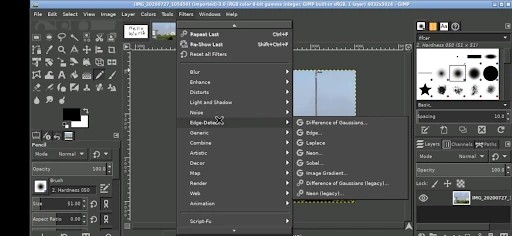

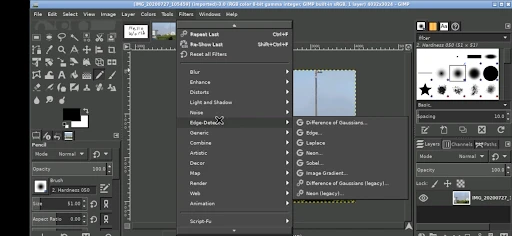

Exploring GIMP: The Capable Free Editor for Images
In discussions of image editing software, GIMP consistently emerges as a prominent option. This open-source application stands as a powerful, cost-free alternative to commercial editing suites, earning a dedicated following across skill levels. But how does it truly measure up? We’ll examine the core elements that define the GIMP experience.
Initial Steps with GIMP
Getting started is straightforward. A visit to the official website provides a free download for your system. New users, particularly those familiar with applications like Photoshop, may initially find the interface dense. With some exploration, however, its comprehensive and capable nature becomes apparent.
Understanding the Interface Layout
The workspace can be likened to a well-stocked workshop—every tool is present, though locating a specific one may take familiarity. An initial learning period is expected, but the highly customizable panels and dialogs are a significant advantage. This adaptability allows users to tailor the environment to their workflow, a feature valued by experienced editors.
Examining Its Core Features and Tools
GIMP’s strength lies in its extensive toolkit. It provides all essential functions like cropping and color adjustment alongside advanced features such as layer masks, paths, and a wide array of filters. Support for third-party plugins further extends its capabilities, and the integration of scripting via Python offers deep customization for technical users.
The software also boasts impressive file format compatibility. It handles common types like JPEG and PNG, and can even work with proprietary PSD files. This versatility is crucial for users who collaborate across different software ecosystems.
Assessing Performance and Speed
In terms of performance, GIMP operates efficiently on most modern computers. While processing extremely large or complex files may reveal some limitations, for the vast majority of editing tasks it performs reliably. Considering its zero cost, this level of performance is commendable.
Accessing Support and Learning Materials
A major asset for GIMP is its vibrant, global community. An abundance of user-created tutorials, detailed documentation, and active forums means most questions have already been answered online. This collective knowledge is an invaluable resource for learning and problem-solving.
As with most open-source projects, direct official support is not typically available. Those accustomed to dedicated customer service may need to adjust, but the readily available community resources effectively bridge this gap for persistent learners.
To summarize, GIMP is a formidable editor for users who dedicate time to master it. It may lack some refined touches of its commercial counterparts, but it compensates with deep functionality, customizability, and strong community backing. From hobbyists to professional designers, it delivers a rich editing toolkit that is impressive, especially given its accessible price point: free.
Pros
- Open-source and free to use.
- Extensive range of editing tools.
- Supports various file formats.
- Customizable interface.
- Active community support.
Cons
- Steeper learning curve for beginners.
- Less intuitive than paid alternatives.
- Occasional performance lags.
- Limited advanced features.
- Interface can seem cluttered.
Frequently Asked Questions
What is GIMP and what can I use it for?
GIMP, which stands for GNU Image Manipulation Program, is a free and open-source image editor available for various operating systems like Windows, macOS, and Linux. It is used for tasks such as photo retouching, image composition, and image authoring. With its wide range of features, it's suitable for both beginners and professional graphic designers.
Is GIMP a free software, and are there any hidden costs?
Yes, GIMP is completely free to download and use. It is an open-source software, which means that all of its features are accessible without any cost. There are no hidden charges or premium features that require payment. Users can also modify and distribute the software under the GNU General Public License.
Can I use GIMP for professional graphic design work?
Absolutely, GIMP is a powerful tool that is often used for professional graphic design work. It supports high-quality image manipulation, including complex tasks like layer management, gradients, and blending. While it may not have some of the advanced features found in paid software, it is highly customizable and can be extended with plugins to suit professional needs.
Is GIMP user-friendly for beginners?
While GIMP is a robust and feature-rich application, it may have a steep learning curve for beginners, especially those unfamiliar with image editing software. However, there are numerous tutorials and a supportive community that can help new users learn how to navigate and utilize GIMP effectively. Persistence and practice will greatly assist in mastering GIMP.
What file formats does GIMP support?
GIMP supports a wide array of file formats, making it highly versatile for image editing. Commonly used formats include JPEG, PNG, GIF, TIFF, and PSD (Photoshop). It also supports its own native format, XCF, which preserves layers and other information. This flexibility allows users to work with almost any image file type they encounter.
Technical Info
Recommended For You

Carly — OBD2 car scanner

Jobber: Field Service Software

GoodNovel - Web Novel, Fiction

Find a Grave

10-4 by WEX

Logo Maker : Graphic Designer

GetCode - Virtual Number SMS

Color Wheel
OBD2 Car Scanner - ELM Torque

AI Face Swap Video App-Swapme

Mirror Plus - HD Mirror app

AR Draw Sketch: Trace & Paint

OBDeleven VAG car diagnostics

Bible Launcher-KJV & Prayer

Tracer (Donation Package)

Invitation Maker & Card Design

OfficeSuite Pro + PDF

Desygner: Graphic Design Maker

PDF Pro-View PDF

The General® Auto Insurance

Workforce Tools

Fresha for business

CreArt - AI Image Generator
