
Drawing Desk: Learn to Draw
Art & Design · Learn Drawing Step By Step For Kids And Beginners
Screenshots
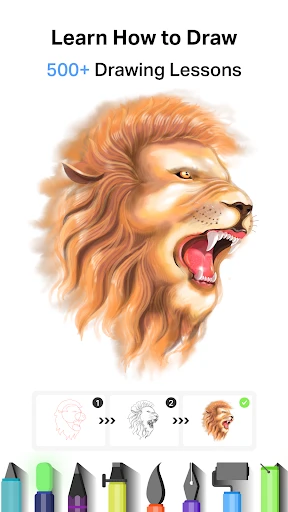




Unlock Your Artistic Potential with Drawing Desk: Learn to Draw
Have you ever doodled in the margins of a notebook or envisioned vibrant artwork in your mind? Drawing Desk: Learn to Draw is designed to bring those visions to life. This app provides a dynamic digital studio to unleash your creativity, filled with an array of brushes, colors, and endless possibilities. Grab your stylus or simply use your fingertip—your journey into digital art starts here.
A Comprehensive Digital Studio
Upon opening the app, you are greeted by an intuitive and welcoming interface. Beginners and seasoned artists alike will appreciate its straightforward navigation. The toolkit is versatile, supporting everything from spontaneous doodles and simple sketches to intricate digital illustrations.
Vast Brush Library and Color Palette: Explore an extensive collection of brushes, such as pencils, markers, watercolors, and airbrushes, suitable for any artistic endeavor. The color picker offers equally deep customization, allowing you to mix and perfect hues to match your vision.
Professional Layering: A standout professional feature is the multi-layer system. Mirroring advanced art software, it lets you edit and refine your work on separate layers, protecting your original drawing and offering non-destructive flexibility. It’s your adjustable digital canvas.
Develop and Hone Your Craft
Drawing Desk distinguishes itself with a strong educational focus. Catering to all skill levels, it houses a wealth of guided tutorials and step-by-step lessons. These resources demystify complex techniques, breaking them down into manageable steps—like carrying a personal art tutor in your device.
Share and Find Inspiration: Connect with a thriving community of creators within the app. Share your artwork, receive constructive feedback, and draw inspiration from others' projects. This social space is ideal for maintaining creative momentum and continuous improvement.
Considerations for Users
While Drawing Desk is packed with features for artists at every level, it is not without minor flaws. Users may occasionally experience slight lag with complex brushes, particularly on older mobile devices. However, this is a small trade-off given the app's overall robust performance and comprehensive toolset.
Subscription Options: A functional free version with core tools is available. For the dedicated artist, the premium subscription unlocks advanced brushes and exclusive content, delivering a more complete and powerful artistic experience.
Final Impressions
Drawing Desk: Learn to Draw is more than a simple application—it's a gateway to creative expression. Whether you're sketching to unwind or crafting a detailed masterpiece, this app supplies the tools, guidance, and support to elevate your art. It combines accessibility with depth, ensuring the joy of drawing is open to all.
From professional illustrators to curious beginners, Drawing Desk invites you to explore. Give it a try—you may just discover a hidden talent waiting to emerge.
Pros
- Intuitive interface for all ages
- Wide variety of drawing tools
- Offline mode available
- Regular updates with new features
- Supports multiple file formats
Cons
- Ads can be intrusive
- In-app purchases required for premium features
- Occasional lag on older devices
- Limited free version features
- No collaboration option
Frequently Asked Questions
What features does Drawing Desk offer for beginners?
Drawing Desk provides a user-friendly interface tailored for beginners. It includes step-by-step tutorials, a variety of brushes, colors, and tools that help users learn to draw efficiently. The app also offers a tracing feature and pre-drawn templates, making it ideal for those new to digital art.
Is Drawing Desk suitable for professional artists?
While Drawing Desk is primarily designed for beginners and casual users, it does offer features that can be appealing to professional artists. These include high-resolution canvas options, a variety of advanced drawing tools, and layers functionality. However, it may lack some of the advanced features found in professional-grade software.
Can I use Drawing Desk without an internet connection?
Yes, Drawing Desk can be used offline. Most of its features, including drawing tools and basic editing functions, are available without an internet connection. However, certain features, such as cloud saving and downloading additional content, require online access.
Does Drawing Desk have in-app purchases or subscriptions?
Drawing Desk offers a free version with basic features, but it also includes in-app purchases and subscription options for users who want to access premium content. These purchases may unlock additional brushes, tools, and advanced features that enhance the drawing experience.
Is Drawing Desk available on both Android and iOS platforms?
Yes, Drawing Desk is available for download on both Android and iOS platforms. Users can find it on the Google Play Store for Android devices and the Apple App Store for iOS devices. The app maintains a consistent experience across both platforms, ensuring users enjoy its features regardless of their device.
Technical Info
Recommended For You

BeautifyX - AI Makeover Studio

Pray Daily - KJV Bible & Verse

Arvin® - AI Logo Maker

Outlined Watch Face

Everand: Ebooks and audiobooks

hoopla Digital

JobStack for Work | Job Search

Smartsheet: Projects & Teams

Bible Chat: Holy Bible Study

OfficeSuite Pro + PDF

Barnes & Noble NOOK

Joist Invoices for Contractors

Moon+ Reader Pro

Daily Bible: Holy Bible KJV

GoTo

CL Theme Card

KeyConnect Digital Car Key

Solo: Your Gig Business App

Holy Bible Study

Floor Plan Creator
Drawing Desk: Learn to Draw

Holy Quran - Deeper journey

CloudLibrary
