AR Draw Sketch: Trace & Paint
Art & Design · Trace Sketch Paint Learn Art For All
Screenshots

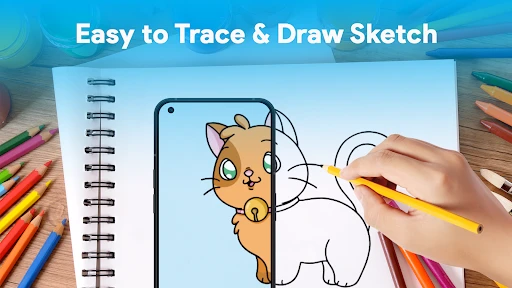


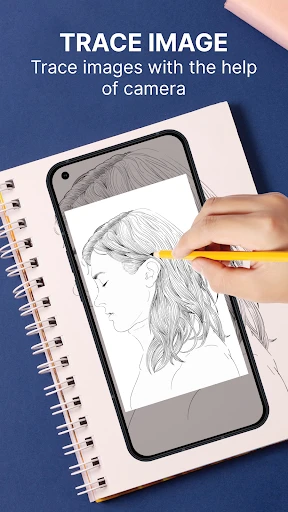
Do you find yourself sketching on any available surface, or have you ever wished to make art but doubted your natural ability? Meet AR Draw Sketch: Trace & Paint, a clever app that acts as your ever-patient, around-the-clock digital art instructor.
Entering the Realm of Augmented Reality Art
This app uses augmented reality to transform your smartphone into a virtual drawing assistant. It works by overlaying a chosen image onto your physical paper via your phone's camera, enabling you to trace and paint effortlessly. For anyone who struggles with simple sketches, this tool is transformative.
Impressive and Intuitive Features
A standout quality is the app's straightforward design. Creating art requires no technical expertise. Simply pick a picture from the built-in gallery or import your own, resize and reposition it, and you can begin tracing immediately.
The grid tool is another valuable asset, aiding in maintaining proper proportions—a common hurdle for many. AR Draw Sketch also offers a wide array of digital drawing instruments, including pencils and brushes, to enrich your creative work.
Unleashing Creativity Through AR
The core augmented reality technology truly distinguishes this app. It employs your camera to cast guidelines and forms directly onto your chosen surface. The ability to modify projection transparency is particularly helpful for concentrating on complex elements.
Its use extends beyond paper; try it on canvases, walls, or fabric for custom projects. The application opens up endless avenues for personalizing spaces or crafting one-of-a-kind handmade items.
Areas That Could Be Enhanced
Although excellent for beginners, the app has minor drawbacks. Calibration can occasionally be inconsistent, particularly in suboptimal lighting, leading to some alignment issues between the projection and your drawing. A little adjustment and persistence typically resolve this.
Additionally, the experience is optimal on devices with larger displays. Users with smaller phones may find it harder to discern the more detailed aspects of their projected image.
Conclusion
In summary, AR Draw Sketch: Trace & Paint is a creative and inclusive app that empowers anyone to explore art. It delights and demystifies the drawing process for novices and practiced creators alike. Witnessing your own hand bring unexpected creations to life feels nothing short of magical. Pick up your device, gather your materials, and start your artistic journey.
Pros
- Easy to use with intuitive controls.
- Large variety of templates available.
- Supports multiple drawing modes.
- Guides for learning sketching techniques.
- Offline use without internet required.
Cons
- Limited free features
- many in-app purchases.
- Some templates require premium access.
- Occasional app crashes reported by users.
- Limited support for advanced artists.
Frequently Asked Questions
What is AR Draw Sketch: Trace & Paint used for?
AR Draw Sketch: Trace & Paint is an innovative app that utilizes augmented reality technology to help users sketch and paint with ease. By overlaying images onto your drawing surface through your device's camera, it guides you to trace and paint accurately. It's perfect for artists of all levels who want to enhance their drawing skills and experiment with new techniques.
Is AR Draw Sketch: Trace & Paint beginner-friendly?
Yes, AR Draw Sketch: Trace & Paint is designed with beginners in mind. The app provides step-by-step guidance through its augmented reality features, making it easy for users with little to no drawing experience to start creating impressive sketches. The intuitive interface and helpful tutorials ensure a smooth learning curve.
Can I use AR Draw Sketch: Trace & Paint without an internet connection?
While AR Draw Sketch: Trace & Paint requires an initial internet connection for downloading and setting up, once the app is installed, it can be used offline. This allows users to enjoy drawing and painting anywhere, anytime without worrying about connectivity issues.
What are the device requirements for AR Draw Sketch: Trace & Paint?
AR Draw Sketch: Trace & Paint requires a device that supports augmented reality capabilities, typically available on most modern smartphones and tablets. Ensure your device has an updated operating system, sufficient storage, and a functional camera to fully enjoy the app's features.
Are there any additional costs or in-app purchases in AR Draw Sketch: Trace & Paint?
AR Draw Sketch: Trace & Paint is free to download and use, but it does offer optional in-app purchases. These purchases can enhance your experience by unlocking advanced features, additional tools, and exclusive content. However, the app provides a comprehensive drawing experience even without these extras.
Technical Info
Recommended For You

Al Quran MP3 Audio Offline App

AniDraw: 2D Draw Animation

One Block for Minecraft Maps

Blue Yonder Workforce

CVTz50

Power Apps

Learn how to draw - ArtWorkout

UKG Dimensions

Poseit

All Document Reader:PDF Viewer

Beauty Makeup Editor & Camera

Job Hai - Search Job, Vacancy

English-Myanmar Dictionary

AR Drawing: Sketch, Art, Paint

Driving Instructor-Theory Test

Daily Bible Devotion & Prayer

Texture Maker for Minecraft PE

My crochet designer

Life Bible

Meeting - Video Conference

Holy Quran - Deeper journey

Autolist: Used Car Marketplace

Poster Maker - Flyer Maker