
Stickman: draw animation maker
Art & Design · Create Stickman Animations Easily For Everyone
Screenshots



Unleash Your Imagination with Stickman: Draw Animation Maker
Calling all animation enthusiasts! Have you ever dreamed of creating your own cartoons but felt overwhelmed by complex programs? Your solution has arrived. Stickman: Draw Animation Maker is the perfect tool to transform your creative visions into animated reality, effortlessly. Discover what makes this app a favorite for both beginners and seasoned animators.
Designed for Effortless Onboarding
The first thing you'll notice is the intuitive design. Launching Stickman: Draw Animation Maker reveals a clean, logical interface that encourages immediate creation. Lengthy tutorials are unnecessary, as every tool is conveniently placed and easy to understand. Regardless of your experience, you'll feel comfortable and ready to create within minutes.
A robust suite of drawing tools empowers you to craft everything from basic forms to intricate scenes. The beauty lies in its accessibility—you don't need professional art skills to produce engaging work. Simply follow your inspiration, and the app provides the means to realize it.
Powerful Features to Fuel Creation
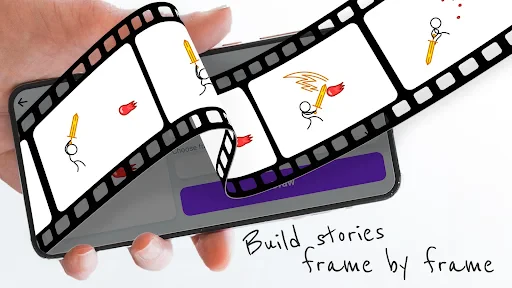
Beyond the basics, this app shines with specialized animation capabilities. The cornerstone is its frame-by-frame editor, enabling you to build smooth, polished animations. Control playback speed, integrate dynamic backgrounds, and layer in audio to elevate your projects.
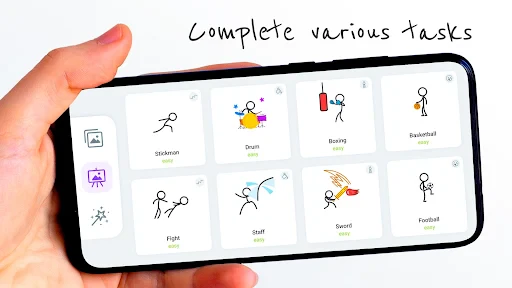
For those seeking a quick start, the pre-built stick figure library is a game-changer. Use these versatile characters as a foundation, then customize and animate them with your unique flair. It’s like directing a cast of digital actors, opening endless storytelling possibilities.
Share Your Creations with Ease
Once your masterpiece is complete, sharing it is straightforward. Stickman: Draw Animation Maker allows you to export your work in multiple formats with minimal effort. Quickly post to social platforms, send directly to friends, or upload to animation communities to grow your viewer base. Broad file compatibility eliminates frustrating conversion issues.
There’s undeniable joy in receiving feedback on your creations. This sharing loop is an excellent way to gain insights and refine your skills as an animator.
The Ideal Launchpad for Animators
In summary, Stickman: Draw Animation Maker distinguishes itself in the world of animation software. Its user-friendly approach, combined with potent features and seamless sharing, makes it an essential tool for any aspiring creator. Whether your ambition is witty stick-figure shorts or more elaborate cartoon narratives, this app can bring them to life.
Don't hesitate. Grab your device, unleash your creativity, and begin your exciting animation journey with Stickman: Draw Animation Maker. Your artistic adventure awaits.
Pros
- User-friendly interface for beginners.
- Wide range of drawing tools available.
- Supports frame-by-frame animation.
- Export animations in various formats.
- No watermark on exported projects.
Cons
- Limited advanced animation features.
- Occasional app crashes reported.
- In-app ads can be intrusive.
- Requires internet for some features.
- Limited community support and tutorials.
Frequently Asked Questions
What is Stickman: draw animation maker?
Stickman: draw animation maker is an intuitive app designed for both beginners and experienced animators to create simple animations using stick figures. The app provides a user-friendly interface that allows users to draw and animate with ease, transforming their creative ideas into smooth animations without requiring extensive animation skills.
Can I export my animations from Stickman: draw animation maker?
Yes, Stickman: draw animation maker allows users to export their animations in various formats. You can easily share your work on social media platforms or save it on your device for future use. This feature ensures that your creative animations can reach a wider audience or be utilized in other projects.
Does Stickman: draw animation maker offer tools for advanced animations?
While Stickman: draw animation maker is designed with simplicity in mind, it does offer several advanced tools for more experienced animators. These tools include layers, frame-by-frame animation control, and a variety of drawing tools to enhance the complexity and polish of your animations, making it suitable for both novices and experts.
Is Stickman: draw animation maker suitable for beginners?
Absolutely, Stickman: draw animation maker is perfect for beginners. The app offers a straightforward and intuitive interface with helpful tutorials and guides. This makes it easy for newcomers to the world of animation to start creating and learning without being overwhelmed by complex features or technical jargon.
Are there in-app purchases or ads in Stickman: draw animation maker?
Stickman: draw animation maker is available as a free app with optional in-app purchases. These purchases allow users to unlock additional features and tools. The app may also display ads, but they are generally non-intrusive, ensuring a smooth and enjoyable animation experience without constant interruptions.
Technical Info
Recommended For You

AppBarber: Cliente

myQQ – Quick Quack

CL Theme C1

Handshake Jobs & New Careers

Videa: AI Video Maker, Effects

Cookie Cutters

Mark - AI Logo Generator

Learn to Draw Anime by Steps

Readict -One Click Away Novels

Hinovel

BitBible (Lockscreen, English)

PSWaves Live Wallpapers

AR Drawing - Sketchar App

PrinterShare Mobile Print

Nice Miner: Bitcoin Miner Hash

Thrift Savings Plan

DriveTime Used Cars for Sale

NovelBar-Your Reading Haven

Passio GO!

Fax.Plus - Send Fax from Phone

DreamPic - AI Image Generator

Staples - Deals & Shopping

850 OBD-II
