
Inky - Run Inkscape on Android
Art & Design · Inky Mobile Vector Design For Creators On Android
Screenshots
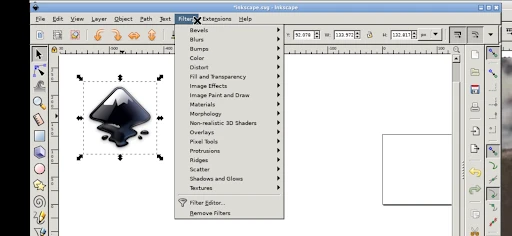
Inky: Bringing Inkscape to Android Devices
For graphic designers who need to work remotely, Inky presents an intriguing solution. This application promises to deliver the comprehensive functionality of the Inkscape vector editor directly to Android phones and tablets. The prospect of accessing a full-featured design tool on a mobile device is certainly compelling. Let's explore how well it accomplishes this goal.
Installation and Initial Setup
The installation process for Inky is straightforward. A quick visit to the Google Play Store and a simple download is all that's required. The application maintains a small footprint, ensuring it runs efficiently even on devices that aren't top-of-the-line.
Upon launching Inky, users familiar with the desktop version of Inkscape will recognize the interface layout. The developers have successfully preserved the core feel of the original software, easing the transition for existing users. Newcomers may face a short learning period, but this is typical for any powerful design platform.
Core Functionality and Tools
Inky is equipped with a robust set of features for mobile vector graphic creation. Its node editing tool is particularly impressive, offering intuitive control for precise adjustments to lines and curves—a critical capability for professional work.
The inclusion of a layer management system is another significant advantage. This feature allows for organized, non-destructive editing, enabling experimentation within a project. Having layer support on a mobile device substantially enhances its utility for serious design tasks.
Furthermore, Inky supports a comprehensive range of file formats for both import and export. This flexibility ensures designs can be easily shared for client review or prepared for final production needs.
Adapting to a Mobile Workflow
The primary advantage of Inky is the freedom to design from any location. It effectively transforms idle moments, like waiting for an appointment or commuting, into productive design sessions. Your mobile device becomes a compact, portable studio.
Working on a phone or tablet screen does require an adjustment, especially for those used to expansive desktop displays. However, with practice, the interface becomes manageable. Support for a stylus input is highly recommended, as it greatly improves drawing accuracy and overall control.
Final Impressions
Inky - Run Inkscape on Android stands as a credible bridge between desktop-grade graphic design and mobile convenience. While it has some quirks inherent to the platform, its overall utility is undeniable. Both professional designers and hobbyists will find it a valuable addition to their creative toolkit.
When inspiration strikes away from your desk, Inky offers a powerful way to capture it. This app has strong potential to become an essential mobile application for vector design.
Pros
- Seamlessly runs Inkscape on Android.
- Supports SVG and various file formats.
- Offers touchscreen-friendly interface.
- Regular updates with new features.
- Compatible with stylus for precision.
Cons
- May lag on older devices.
- Limited advanced features for pros.
- Occasional crashes during heavy tasks.
- Requires substantial storage space.
- Interface can be overwhelming for newbies.
Frequently Asked Questions
What is Inky and how does it function on Android devices?
Inky is an application that enables users to run Inkscape, a popular vector graphics editor, on Android devices. It functions by providing a mobile-friendly interface that mirrors the desktop experience of Inkscape, allowing users to create and edit SVG files directly from their smartphones or tablets. This app is ideal for graphic designers and artists who want access to powerful editing tools on-the-go.
Is Inky compatible with all Android devices and versions?
Inky is designed to be compatible with a wide range of Android devices. However, it performs best on devices running Android 7.0 (Nougat) and above, with at least 2GB of RAM for optimal performance. Users should ensure their device meets these requirements to avoid potential compatibility issues and to guarantee a smooth experience when using the app.
Does Inky support all features of the desktop version of Inkscape?
While Inky aims to replicate the desktop version of Inkscape on Android, there may be some limitations due to the mobile platform. Most core features, such as path editing, node manipulation, and basic drawing tools, are supported. However, advanced features that require significant processing power might be limited or unavailable, depending on the device’s capabilities.
What are the storage requirements for installing Inky on an Android device?
Inky requires a minimum of 200MB of free storage space to install on an Android device. Additionally, users should have extra storage available for saving their projects, as vector files can sometimes be large, especially with complex designs. It is recommended to have at least 500MB of free space to ensure smooth operation and adequate space for file management.
Is there any cost associated with downloading and using Inky on Android?
Inky is available for free download on the Google Play Store, providing users access to its basic features without charge. However, there may be in-app purchases available for additional features or tools. Users should check the app description for detailed information on any potential costs and consider their needs before opting for premium features.
Technical Info
Recommended For You

Webmotors: comprar carro

PocketBook reader - any books

RhymeZone Rhyming Dictionary

Public Storage

GlossGenius

Cars.com: Buy and sell cars

Discount Tire

O’Reilly First Call VIN Scan

Valvoline Instant Oil Change

Lexus

Pixel Studio PRO: editor

FillUp - Gas Mileage Log

Drawing Pad Pro - Sketchpad

CarParts.com

Face Massage, Skincare: forYou

Soul EV Spy

Bible Homescreen - Read Now

MyNISSAN®

Дром Авто

Drivers Permit Practice

English-Myanmar Dictionary

Tattoo AI - Tattoo Design

Blessed - Bible verse & Prayer
