
Photo Editor - Retouch Photos
Art & Design · Photo Editor Retouch Enhance Share For Everyone
Screenshots
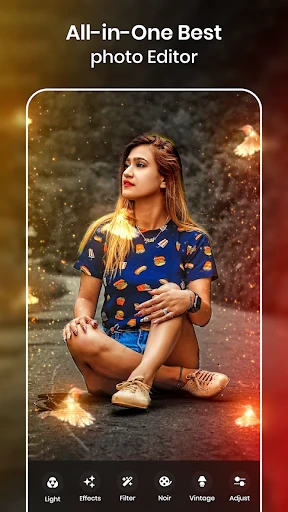


Effortlessly Enhance Your Images in Moments
Ever wished you could professionally enhance your pictures with only a few simple touches? Allow me to introduce Photo Editor - Retouch Photos, an application that places a complete editing suite directly onto your mobile device. Suitable for complete beginners and expert editors alike, this app delivers powerful functionality for every user.
The Defining Qualities of This Editor
The app’s design prioritizes clarity and ease of use immediately. Its logical layout ensures you can navigate and locate any function without confusion or prior expertise. The toolkit is both comprehensive and impressive, spanning from essential corrections such as exposure and color balance to sophisticated capabilities like object removal and depth-of-field effects.
Its retouching suite is particularly remarkable. Achieve flawless skin, brighten smiles, and enhance eye clarity with results that remain subtle and authentic. The edits integrate seamlessly, preserving the natural look of your photo. Additionally, a broad selection of artistic filters and stylistic effects is available to instantly elevate your image’s impact.
Powerful Editing and Expressive Features
Explore deep personalization with every adjustable parameter. Fine-tune each effect to match your exact creative vision, granting you total command over the final result. Whether aiming for a classic film aesthetic or a crisp, contemporary finish, the app accommodates your style. You can even store custom presets to apply your preferred adjustments instantly later.
The integrated collage creator is another highlight, ideal for combining several memories into a single, beautiful presentation. Choose from numerous designed frames and arrangements to build polished multi-image compositions quickly. For avid social media users, built-in sharing allows you to publish your finished work to your favorite platforms without leaving the app.
Performance and Value Considerations
Performance is a key strength; the app operates with notable speed and responsiveness. Edits render in real-time, free from the lag or slowdowns common in other editors. It is optimized to run efficiently without straining your device’s battery or storage, providing a reliable experience across both Android and iOS platforms.
Regarding cost, a fully-featured free version is available for fundamental editing. Access to the entire catalog of advanced tools and premium content requires a subscription. Considering the professional-grade results and extensive feature set, the investment is highly competitive and justifiable for serious photo enhancement.
To summarize, Photo Editor - Retouch Photos is an exceptional tool for easily upgrading your photography. It merges a sophisticated array of editing options with a streamlined, approachable interface, catering to all levels of experience. When your photos deserve a polished, high-quality finish, this is the app to choose. Enjoy creating!
Pros
- User-friendly interface
- easy to navigate.
- Wide variety of editing tools available.
- High-quality filters enhance images.
- Supports multiple image formats.
Cons
- In-app purchases can be expensive.
- Occasional ads disrupt user experience.
- Some features require internet connection.
- Limited free version capabilities.
- Consumes significant battery life.
Frequently Asked Questions
What features does Photo Editor - Retouch Photos offer?
Photo Editor - Retouch Photos provides a wide array of tools for enhancing your images. From basic adjustments like brightness, contrast, and saturation to advanced retouching features such as blemish removal, skin smoothing, and object removal, this app covers all your photo editing needs. It also includes a variety of filters and special effects to give your photos a unique look.
Is Photo Editor - Retouch Photos user-friendly for beginners?
Yes, Photo Editor - Retouch Photos is designed with an intuitive interface that makes it accessible for users of all skill levels. Beginners will appreciate the easy-to-navigate menus and straightforward tools, while more experienced users can take advantage of the app’s advanced editing features. The app also offers tutorials and tips to help new users get started.
Can I share edited photos directly from the app?
Absolutely! Photo Editor - Retouch Photos allows you to share your edited images directly from the app to various social media platforms, including Instagram, Facebook, and Twitter. You can also save the edited photos to your device in high resolution, ensuring that your images look great both online and offline.
Is there a cost associated with using Photo Editor - Retouch Photos?
Photo Editor - Retouch Photos is available as a free download with optional in-app purchases. While the free version offers a range of basic editing tools, purchasing the premium version unlocks additional features such as advanced filters, high-resolution export options, and ad-free usage. Users can choose the plan that best fits their needs and budget.
Does Photo Editor - Retouch Photos support RAW image files?
Yes, Photo Editor - Retouch Photos supports editing of RAW files, which is an essential feature for professional photographers who need to preserve image quality. The app allows you to import, edit, and export RAW files, providing flexibility and maintaining the high-quality details of your photographs throughout the editing process.
Technical Info
Recommended For You

BookTok- Read Good Novel

AR Drawing: Paint & Sketch Art

Scentbird Monthly Perfume Box

PayPal Business

E-PASS Toll App

Librera PRO - Book reader

Vaporwave PRO Wallpapers

5 Calls: Contact Your Congress

Thumbtack for Professionals

PayPal POS (ex Zettle)

RepairSolutions2

DriveTime Used Cars for Sale

Member Tools

AI Art Generator: Photo, Draw

CarMax: Used Cars for Sale
ArtCanvas: Learn how to draw

Jotform - Form, Sign & Survey

Roadie Driver

Picky - Beauty Community

WhenToWork Employee Scheduling

BeautifyX - AI Makeover Studio

Coinoscope: Coin identifier

aesthetic background
