Simple Drawing - Sketchbook
Art & Design · Simple Drawing Sketchbook For Everyone To Doodle Ideas
Screenshots
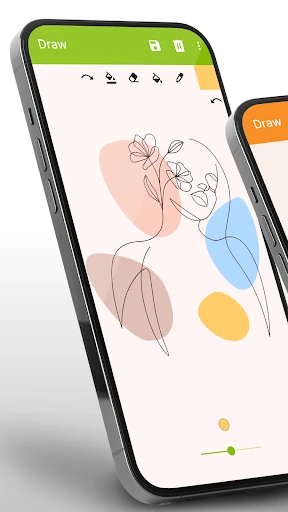


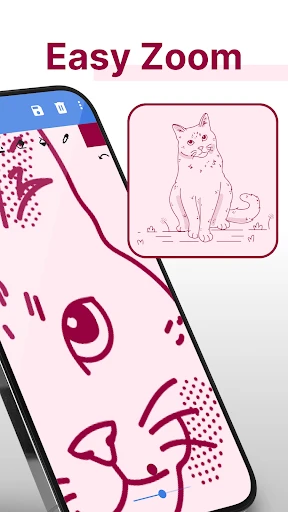

Unleash Your Creativity with Simple Drawing - Sketchbook
Ever find yourself sketching on a napkin, longing for a dedicated space to set your imagination free? Simple Drawing - Sketchbook is the perfect digital solution. Ideal for aspiring artists and casual doodlers alike, this app provides an intuitive and straightforward platform to sketch, draw, and express your creativity.
First Impressions
Simple Drawing - Sketchbook greets you with a clean, approachable interface. Upon launching, a fresh canvas immediately invites your ideas. The navigation is wonderfully instinctive, requiring no tutorial—every tool and option is logically placed for instant access.
Core Tools and Features
The app stands out through its comprehensive toolkit. It offers a variety of pencils and brushes with adjustable textures and thicknesses, alongside an extensive color palette. It’s akin to carrying a complete art studio in your device. The layer functionality is a standout, allowing for detailed work without the risk of disturbing your underlying sketch.
Gesture Controls: Actions like swiping, pinching, and zooming are fluid and responsive, mirroring the natural feel of a physical sketchbook.
Color Picker: The color selection tool is both precise and user-friendly, enabling you to match the exact hue in your mind’s eye.
Undo and Redo: Made a mistake? Not an issue. Robust undo and redo functions are readily available to correct any misstep.
Performance and Experience
Performance-wise, the app operates seamlessly without lag, a critical factor for maintaining creative flow. Testing across multiple phones and tablets revealed consistent, smooth performance, highlighting the developers' commitment to a polished and reliable user experience.
Areas for Enhancement
While Simple Drawing - Sketchbook is excellent, potential improvements exist. Introducing a social gallery feature for sharing artwork and receiving feedback would be a fantastic addition. This could foster a creative community and inspire users through exposure to diverse artistic styles.
Final Verdict
Ultimately, Simple Drawing - Sketchbook is a superb app for drawers of all skill levels. Its user-friendly design, paired with a powerful toolset, makes it a premier choice for artistic exploration. If you seek a digital sketchpad that is both capable and delightful to use, Simple Drawing - Sketchbook is well worth your attention. It may just be the ideal creative companion you need.
Pros
- User-friendly interface.
- Quick setup and use.
- Offline functionality.
- Lightweight app.
- Free basic features.
Cons
- Limited drawing tools available.
- No layers for advanced editing.
- No cloud saving feature.
- Ads disrupt drawing experience.
- Not optimized for tablets.
Frequently Asked Questions
What is Simple Drawing - Sketchbook?
Simple Drawing - Sketchbook is a user-friendly mobile application designed for artists and doodlers of all levels. It provides a digital canvas for sketching, drawing, and painting, featuring a variety of brushes, colors, and tools that mimic real-life art supplies. Ideal for both casual and professional use, it offers a seamless drawing experience on both Android and iOS devices.
Is Simple Drawing - Sketchbook free to use?
Yes, Simple Drawing - Sketchbook offers a free version with essential features that allow you to create and save your artwork. However, there may be in-app purchases available, offering additional brushes, tools, and features for a more enhanced drawing experience. These optional upgrades can be purchased directly within the app.
What are the key features of Simple Drawing - Sketchbook?
Simple Drawing - Sketchbook boasts a range of features such as diverse brush options, customizable color palettes, layers for complex drawings, and an intuitive interface that is easy to navigate. The app also supports pressure sensitivity for stylus users, enabling more detailed and expressive art creation. It is designed to cater to both beginners and experienced artists.
Can I share my drawings directly from the app?
Yes, Simple Drawing - Sketchbook allows you to easily share your creations directly from the app. Once your artwork is complete, you can export it in various formats and share it via social media, email, or cloud storage. This feature ensures your art can reach a wider audience quickly and conveniently.
Is Simple Drawing - Sketchbook suitable for professional artists?
Absolutely, Simple Drawing - Sketchbook is suitable for professional artists. It offers advanced features like layering, a wide array of brushes, and support for stylus pressure sensitivity, making it a versatile tool for intricate and professional artwork. Whether for concept art, illustrations, or digital paintings, the app provides the necessary tools for high-quality creations.
Technical Info
Recommended For You

Adobe Capture: Illustrator,Ps

Microsoft Teams

Fable: Books & TV

Zoom Workplace

HerBible--Verses&Prayer

AutoZone Auto Parts & Repair

Readict -One Click Away Novels

TCA Plus (TCA 2024)

Cvent Events

Uber - Driver: Drive & Deliver

StyleSeat: Book Hair & Beauty

GigSmart Get Gigs

Dynamic Drive

The Language of Letting Go

Obd Mary – Car Scanner for ELM

Edmunds - Shop Cars For Sale

Ancestry: Family History & DNA

GoDaddy Studio: Create & Grow

Smartsheet: Projects & Teams

Hwahae(Korea’s Beauty APP)

Kling AI: AI Image&Video Maker

Birthday Invitation Card Maker

Thumbtack for Professionals