
Microsoft Designer
Art & Design · Design App For Everyone Create Visual Content Effortlessly
Screenshots
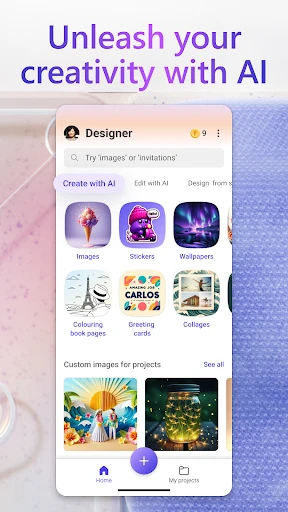
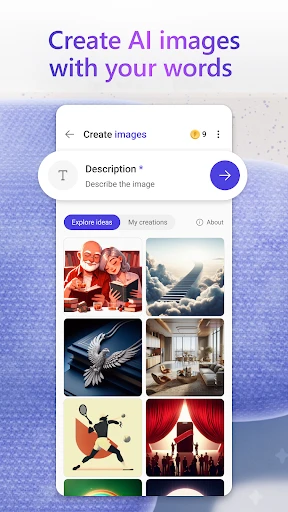


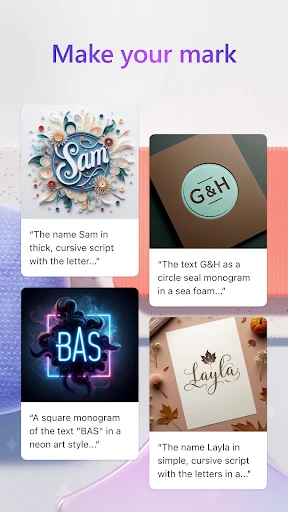
Create Professional Designs Effortlessly
Intuitive and Streamlined Interface
Upon launching Microsoft Designer, the interface presents a clean and approachable workspace. It avoids overwhelming users with complex toolbars or excessive options. The navigation is logical and straightforward, allowing you to focus on creating. The organization into distinct sections is particularly appreciated, enabling you to begin a new design project instantly and with clarity.
Vast Library of Professionally Crafted Templates
A standout feature is the app's extensive collection of templates. Whether your project is an event poster, a social media post, or professional stationery, a relevant template exists. These are far from generic; they are professionally designed to ensure your outputs appear polished and credible. Selecting a template provides a powerful head start toward a visually impressive result.
Complete Creative Control and Customization
While templates provide an excellent foundation, Microsoft Designer truly excels in its customization capabilities. Every element is fully editable to reflect your vision. Change color schemes, experiment with typography, or integrate personal imagery—the creative possibilities are nearly endless. The process of tweaking designs is both simple and engaging, consistently yielding unique and eye-catching creations.
Seamless Real-Time Collaboration Features
Recognizing the need for teamwork, the app incorporates seamless collaborative functions. Multiple users can edit a design simultaneously, facilitating effortless brainstorming and rapid iteration. Combined with cloud-based saving, your projects are accessible and editable from any device, making remote work and on-the-go adjustments perfectly simple.
Cross-Platform Performance and Compatibility
Regarding technical performance, Microsoft Designer operates smoothly on both Android and iOS platforms. It remains stable and responsive, even when handling detailed graphics. The application supports a wide array of export formats, ensuring your designs are ready for both digital sharing and professional printing. The experience is consistently optimized, providing a reliable and high-quality interface across phones and tablets.
In summary, Microsoft Designer transforms graphic design into an accessible and powerful endeavor for all skill levels. It combines an intuitive approach with deep functionality, serving as a versatile solution for diverse creative needs. For producing striking visual content with efficiency and ease, this application is highly recommended. You will quickly find yourself creating with confidence and professional flair.
Pros
- Intuitive UI for seamless design.
- Wide range of templates available.
- Collaborative features integrated.
- Cross-platform compatibility.
- Regular updates with new features.
Cons
- Requires a Microsoft account to use.
- Limited offline functionality.
- May consume significant storage.
- Occasional lag on older devices.
- Subscription needed for premium features.
Frequently Asked Questions
What is Microsoft Designer and what can I use it for?
Microsoft Designer is a versatile graphic design tool that allows users to create stunning visuals, including social media posts, presentations, and marketing materials. The app offers a wide range of templates and customization options, making it ideal for both personal and professional projects. Whether you're a beginner or an experienced designer, Microsoft Designer provides the tools to bring your creative ideas to life.
Is Microsoft Designer free to use, or does it require a subscription?
Microsoft Designer offers a free version with basic features and templates, allowing users to get started on their design projects without any cost. However, for more advanced features and a broader range of templates, a subscription to Microsoft 365 may be required. The subscription provides access to premium content and additional design functionalities.
Can I use Microsoft Designer on mobile devices, or is it limited to desktop use?
Microsoft Designer is designed for flexibility and is available on both desktop and mobile platforms. Users can download the app on iOS and Android devices, ensuring that they can work on their design projects on-the-go. The mobile app offers a user-friendly interface, optimized for touch screen interaction, making it convenient to create and edit designs from anywhere.
What types of templates and design elements does Microsoft Designer offer?
Microsoft Designer boasts a comprehensive library of templates and design elements, catering to a wide range of projects. Users can access templates for social media graphics, business cards, flyers, and more. The app also includes a variety of fonts, icons, and images, allowing users to fully customize their designs. Regular updates ensure that new content is continually added to the library.
How user-friendly is Microsoft Designer for beginners?
Microsoft Designer is highly user-friendly, making it suitable for beginners who may have little to no experience with graphic design. The app features an intuitive drag-and-drop interface, along with helpful tutorials and tips to guide new users through the design process. With its straightforward navigation and easy-to-use tools, beginners can quickly learn to create professional-looking designs.
Technical Info
Recommended For You

Paycor Mobile

Drawing Pad Pro - Sketchpad

BookFunnel

AR Drawing : Trace Anything

CARFAX - Shop New & Used Cars

Poseit

Rain Instant Pay

Mirror App - Beauty Mirror
N6_Theme for Car Launcher app

USPS MOBILE®
[KNA008] COMBINE

Blinq: Digital Business Card

Car-Part.com Used Auto Parts

Christmas Photo Frames & Cards

FlipArtify - 2D Draw Animation

BikeWale- Bikes & Two Wheelers

WhisperFM - Romance Novels

Color by Letter: Sewing game

Wavy: Photo Editor & AI Art

Magnificat Lenten 2025

Whoosh

Jewelry Women Jewellery Photo

Diamond Painting by Number
