AR Drawing: Paint & Sketch App
Art & Design · Sketch In Air Transform Reality With Augmented Art
Screenshots


AR Drawing: Paint & Sketch App
Calling all creatives! Let me introduce you to an app that has transformed my artistic process: AR Drawing: Paint & Sketch App. This tool merges imagination with innovation, offering a futuristic way to sketch and paint that you have to experience.
A Portal to Augmented Creativity
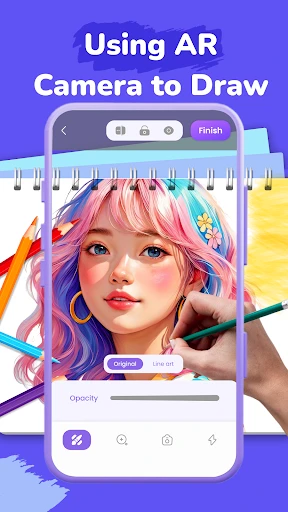
Step into a new dimension of art with AR Drawing: Paint & Sketch App. This application seamlessly combines classic drawing techniques with cutting-edge AR technology, enabling you to cast your creations onto any real-world surface viewed through your camera. Picture decorating your space with temporary, digital murals—it’s a limitless, mess-free canvas at your fingertips.
Intuitive Design for All Skill Levels
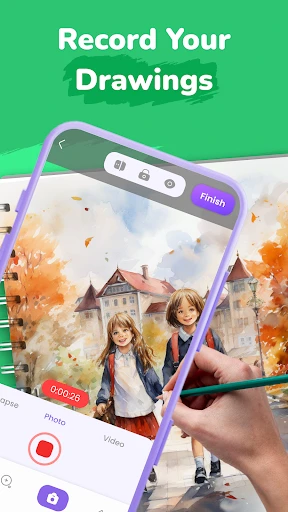
The app’s greatest strength is its accessibility. Its clean, straightforward interface welcomes artists of every background, from novices to experts. A helpful onboarding process gets you started instantly, and then you’re free to create anywhere. The comprehensive toolkit, featuring diverse brushes, pencils, and customizable settings for color, size, and transparency, empowers your every artistic decision.
The Magic of Augmented Reality Drawing
The core augmented reality functionality is truly revolutionary. By projecting your sketches into your physical environment in real-time, the app allows for unparalleled creative visualization. Test design ideas for a wall painting or practice perspective drawing directly onto a tabletop. For beginners, the AR tracing guides provide invaluable support, acting like a digital mentor to help build confidence and skill.
Connect and Showcase Your Work
Your art deserves an audience. The app makes sharing effortless with direct integration to social platforms. Beyond posting, you can engage with a built-in community of creators to exchange inspiration, receive critiques, and grow together. Regular creative challenges and new thematic content ensure there’s always a fresh spark to ignite your next project.
In summary, AR Drawing: Paint & Sketch App is not merely a tool—it’s an immersive creative studio. It invites you to reimagine your surroundings as a canvas and explore the boundless possibilities where art and technology meet. Dive in and discover what you can create. Happy drawing!
Pros
- Intuitive interface for easy navigation.
- Wide variety of drawing tools available.
- Supports layers for complex designs.
- Offline mode for uninterrupted creativity.
- Frequent updates with new features.
Cons
- Limited free features in basic version.
- Occasional app crashes reported.
- High battery usage during extended use.
- Requires significant storage space.
- Ads in free version can be distracting.
Frequently Asked Questions
What is AR Drawing: Paint & Sketch App?
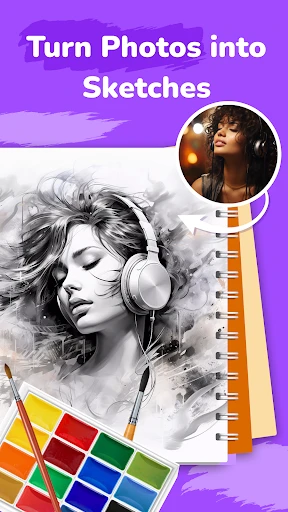
AR Drawing: Paint & Sketch App is an innovative application that allows users to create drawings and sketches using augmented reality technology. By overlaying digital graphics onto the real world through your smartphone's camera, the app provides a unique platform for artists and hobbyists alike to explore their creativity in a more interactive and engaging manner.
How does the augmented reality feature enhance the drawing experience?
The augmented reality feature in AR Drawing: Paint & Sketch App enhances the drawing experience by allowing users to project their sketches onto real-world surfaces. This means you can draw over real objects or spaces, making it easier to visualize your artwork in a three-dimensional context. This feature is particularly useful for artists looking to explore spatial awareness and depth in their creations.
Is AR Drawing: Paint & Sketch App suitable for beginners?
Yes, AR Drawing: Paint & Sketch App is designed to cater to users of all skill levels, including beginners. The app provides tutorials and tips to help newcomers get started with augmented reality drawing. Additionally, its user-friendly interface ensures that even those new to digital art can navigate the app with ease and begin creating impressive sketches quickly.
What devices are compatible with AR Drawing: Paint & Sketch App?
AR Drawing: Paint & Sketch App is compatible with a wide range of devices. However, since it relies on augmented reality technology, it is best suited for smartphones and tablets that support ARCore (for Android) or ARKit (for iOS). It's important to check the app's compatibility with your device model to ensure optimal performance and experience.
Are there any in-app purchases or subscriptions in AR Drawing: Paint & Sketch App?
While AR Drawing: Paint & Sketch App is free to download, it does offer in-app purchases and subscription options. These can provide access to additional features, such as premium brushes, advanced editing tools, and ad-free experiences. Users can choose to enhance their creative process by purchasing these extras, though they are not necessary to enjoy the core functionalities of the app.
Technical Info
Recommended For You

Droid Dashcam - Video Recorder

iScanner - PDF Scanner App

Creati AI Photo Generator

AR Draw Sketch: Trace & Paint

Blinq: Digital Business Card

Vagaro Pro

Carmin

Obd Mary – Car Scanner for ELM

Fonts - Logo Maker

USAA DriveSafe

SAP Concur

Discount Tire
AR Drawing Sketch Paint

IPSY: Personalized Beauty

AI Video Generator - Clips AI

Google Play Books & Audiobooks

AI Art Generator: AI Picture

Unicorn Stickers & Emoji Packs

Bimma EWD - Wiring Diagrams

Drawing Desk: Learn to Draw

Invitation Maker & Card Design

Whoosh

Audible: Audio Entertainment