
UPS
Business · UPS Package Delivery Tracking Business Solutions
Screenshots
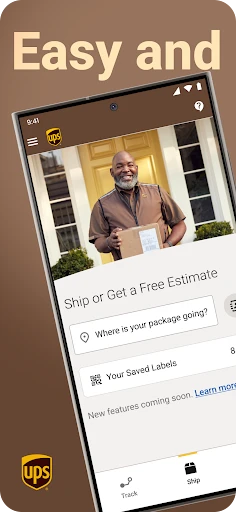
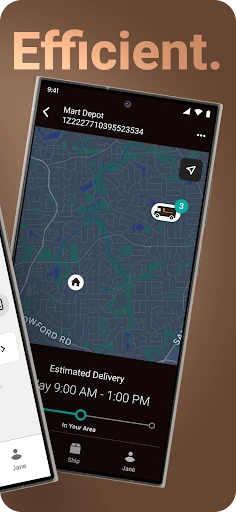
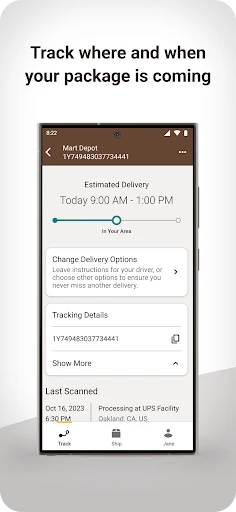
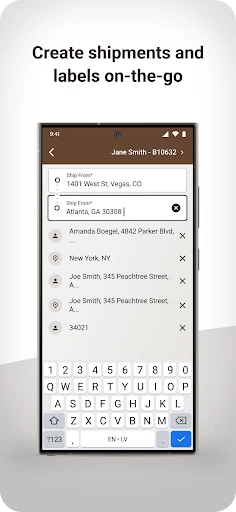

Your Essential Companion for Managing Shipments
The UPS mobile application transforms your smartphone into a powerful tool for navigating global logistics. Designed for both personal and business use, it simplifies sending, receiving, and tracking parcels across the street or across oceans. This overview will detail the app's core functions, its performance in daily use, and the practical benefits it brings to managing your deliveries.
Downloading and Initial Setup
Installing the UPS application is a quick and simple process on both iOS and Android devices. Upon launching, users are met with a clean, organized interface that promotes easy navigation. Account creation or login is effortless, and existing UPS customers will find their information and preferences seamlessly integrated.
Core Features for Shipping and Tracking
The "Track Your Package" function provides immediate, real-time status updates for your shipments, offering peace of mind and eliminating guesswork. For sending items, the "Ship Now" feature guides you through calculating costs, selecting service levels, and scheduling pickups with minimal steps. It effectively handles everything from casual gifts to routine returns.
Business users gain access to a suite of logistical tools, including multi-shipment management and label generation. The app also supports global commerce with international shipping calculators and essential customs information, aiding businesses in navigating cross-border trade.
Overall User Experience and Performance
Interacting with the UPS app is generally intuitive and efficient, akin to a dedicated shipping assistant. Notifications are timely and informative without being overwhelming. Should questions arise, a comprehensive support section—featuring guides, FAQs, and customer service contact options—provides reliable help.
Application performance is predominantly smooth, though occasional slowdowns may occur during periods of high user traffic. These instances are typically minor and do not significantly detract from the app's overall reliability and utility.
Final Assessment
The UPS mobile app delivers a robust and user-friendly platform for tackling a wide range of shipping tasks. It is a valuable asset for occasional shippers and logistics managers alike. While performance optimizations could enhance the experience during peak times, its comprehensive feature set packaged in an accessible design makes it a highly recommended tool. For streamlined package management, the UPS app effectively places global shipping capabilities in the palm of your hand.
Pros
- Reliable package tracking
- User-friendly interface
- Multiple delivery options
- Secure delivery confirmation
- Global reach
Cons
- Limited free features
- Occasional app crashes
- Requires frequent updates
- Customer support issues
- Account setup complexity
Frequently Asked Questions
What are the main features of the UPS app?
The UPS app provides a range of features designed to make shipping and tracking packages easier. Users can track shipments in real-time, create shipping labels, find UPS locations, and manage their UPS My Choice account. The app also offers push notifications for status updates, estimated delivery times, and a feature to reschedule deliveries or reroute packages to a different address.
Is the UPS app free to use or are there any hidden charges?
The UPS app itself is free to download and use for basic functions like tracking packages and finding UPS locations. However, fees may apply for certain premium services, such as creating shipping labels, scheduling pickups, or using advanced features like UPS My Choice Premium. It's important to check for any applicable charges based on the services you plan to use.
How secure is my personal information on the UPS app?
The UPS app takes user privacy and data protection seriously. It uses encryption and secure protocols to protect your personal and payment information. UPS adheres to strict privacy policies and complies with industry standards to ensure the safety of your data. Users are encouraged to regularly update the app to benefit from the latest security enhancements.
Can I track multiple packages simultaneously using the UPS app?
Yes, the UPS app allows users to track multiple shipments at once. You can easily add tracking numbers to your dashboard for quick access. The app provides real-time updates and notifications for each package, making it convenient to manage several deliveries simultaneously. This feature is especially useful for businesses and individuals who frequently ship or receive multiple packages.
What should I do if I encounter issues using the UPS app?
If you experience any problems with the UPS app, such as login issues or tracking errors, there are several support options available. Firstly, check the app's FAQ or help section for common solutions. If the issue persists, you can contact UPS customer service via phone, email, or chat through the app. They can provide assistance and troubleshoot any issues you may encounter.
Technical Info
Recommended For You

IPSY: Personalized Beauty

Holy Bible Time-Verses&Audio

AR Drawing: Sketch, Art, Trace

Nice Miner: Bitcoin Miner Hash

VIN Check Report for Used Cars

Pixelcut AI Photo Editor

Drawing Pad Pro - Sketchpad

PayPal POS (ex Zettle)

Holy Bible - KJV+Audio+Verse

Cars.com: Buy and sell cars

MM-Calendar

NavRadio+

Pray Daily - KJV Bible & Verse

Pixl - Face Retouch & Blemish

GoTo

CreArt - AI Image Generator

Coloring games: speed drawing

OpenSea: NFT marketplace

Calibre Sync

BambooHR

Filter for Selfie

OBD Scanner ELM327: GaragePro

Skincare Routine: FeelinMySkin
