OBD2 Car Scanner - ELM Torque
Auto & Vehicles · Car Scanner App For Vehicle Diagnostics And Performance
Screenshots



OBD2 Car Scanner - ELM Torque: Your Essential Automotive Companion
For every driver who values their vehicle's health, the OBD2 Car Scanner - ELM Torque app emerges as a powerful tool. This application transforms your smartphone into a sophisticated diagnostic portal, offering deep insights into your car's performance and well-being.
Understanding the OBD2 Car Scanner - ELM Torque
OBD2, or On-Board Diagnostics, is your vehicle's built-in self-reporting system. The ELM Torque app serves as the interface, decoding this vital data stream. It empowers you to monitor engine performance, diagnose issues, and gain a clearer understanding of your car's operational status, potentially reducing reliance on costly mechanic visits.
Installation and Initial Setup Guide
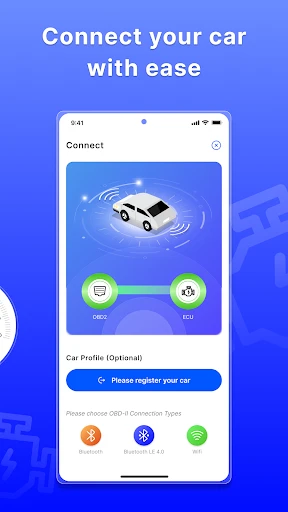
Setup is a straightforward process. Begin by downloading the application from your device's respective app store. Then, connect a compatible OBD2 Bluetooth adapter to your car's diagnostic port, typically located under the dashboard. Finally, pair the adapter with your phone through the app to establish a seamless diagnostic link.
Core Features and Functionality
The application is equipped with a robust suite of automotive tools:
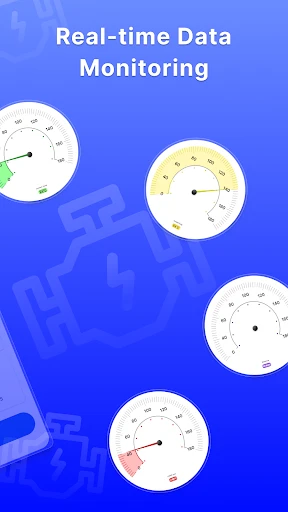
Live Data Monitoring: Access a real-time stream of critical parameters including engine load, vehicle speed, RPM, and coolant temperature, effectively turning your phone into a digital instrument cluster.
Diagnostic Code Services: Read, interpret, and clear standard Diagnostic Trouble Codes (DTCs) to understand the triggers behind your "Check Engine" light and other warning indicators.
Fuel Efficiency Tracking: Monitor and log fuel consumption and calculate real-time MPG, providing valuable data for managing both performance and operating costs.
Personalized Dashboard: Configure a fully customizable display by selecting, arranging, and sizing the gauges and readouts that matter most to you.
Performance and Usability Assessment
The app delivers stable, rapid data transmission for accurate, up-to-the-second information. Its intuitive design ensures navigability for users of all technical backgrounds. While the core application is free, a professional tier unlocks advanced features and deeper vehicle support, representing a valuable upgrade for dedicated enthusiasts.
Conclusion: Is This App Right for You?
The OBD2 Car Scanner - ELM Torque is a highly recommended download for any vehicle owner. It promotes proactive maintenance, demystifies dashboard warnings, and fosters a greater connection between driver and machine. By placing detailed diagnostic information in your hands, it helps prevent minor issues from becoming major expenses.
From daily commuters to automotive hobbyists, this app acts as a pocket-sized mechanic. Take control of your vehicle's diagnostics—download it today and drive with greater confidence and knowledge.
Pros
- User-friendly interface for beginners.
- Supports a wide range of car models.
- Real-time data display feature.
- Customizable dashboard options.
- Affordable compared to competitors.
Cons
- Requires ELM327 device to function.
- Limited features in free version.
- Occasional connectivity issues.
- No offline mode available.
- Interface can lag on older devices.
Frequently Asked Questions
What is OBD2 Car Scanner - ELM Torque and how does it work?
The OBD2 Car Scanner - ELM Torque is a diagnostic tool for car owners that allows them to read and clear trouble codes from their vehicle's electronic control unit (ECU). By connecting your smartphone via Bluetooth to an OBD-II adapter, the app provides real-time data on your vehicle's performance, engine metrics, and error codes. This helps users monitor and maintain their vehicle’s health effectively.
Is my car compatible with OBD2 Car Scanner - ELM Torque?
OBD2 Car Scanner - ELM Torque is compatible with most vehicles manufactured after 1996, which are equipped with an OBD-II port. This includes most cars in the United States, Europe, and Asia. However, it's always recommended to check your car’s manual or consult with the manufacturer to ensure compatibility, especially with older or foreign models.
What are the main features of the OBD2 Car Scanner - ELM Torque app?
The OBD2 Car Scanner - ELM Torque app offers a range of features including real-time engine data monitoring, fault code reading and clearing, performance testing, and fuel economy tracking. Users can also customize dashboards, set up alarms for specific parameters, and access a large database of trouble codes and their meanings. These features make it a comprehensive tool for car diagnostics.
Do I need any additional equipment to use OBD2 Car Scanner - ELM Torque?
Yes, to use OBD2 Car Scanner - ELM Torque, you need an OBD-II Bluetooth adapter, which plugs into your vehicle’s OBD-II port. The adapter communicates with the app on your smartphone to relay data from the car’s ECU. These adapters are widely available online and in automotive stores, and they are generally affordable and easy to install.
Is technical knowledge required to use the OBD2 Car Scanner - ELM Torque app?
While the OBD2 Car Scanner - ELM Torque app is designed to be user-friendly, some basic understanding of vehicle mechanics and diagnostics can be helpful. The app provides detailed information and explanations for the data it displays, which can assist novice users in understanding their vehicle’s performance. However, for complex issues, consulting with a professional mechanic may be advisable.
Technical Info
Recommended For You

NIV Bible

Microsoft Teams

BeautifyX - AI Makeover Studio

Yaelokre OC Maker

hoopla Digital

Outlined Watch Face

Print Photo - Print to Size

AI Art Generator: AI Picture

Picrew PFP & OC Maker

Videa: AI Video Maker, Effects
Shiftsmart - Find Work

WebNovel

Animation Creator: Flipbook 2D

Bolt for Tesla - Tasker Plugin

Girls Hairstyle Step By Step

Beauty Plus Princess Camera

Hexa AI: Logo & Design Creator

TeslaMirror

Wavy: Photo Editor & AI Art

Hair Color Changer: Change you

Clip Studio Paint

FOREO For You

CARFAX - Shop New & Used Cars