
BlueDriver OBD2 Scan Tool
Auto & Vehicles · BlueDriver Professional OBD2 Scanner For Vehicle Owners
Screenshots
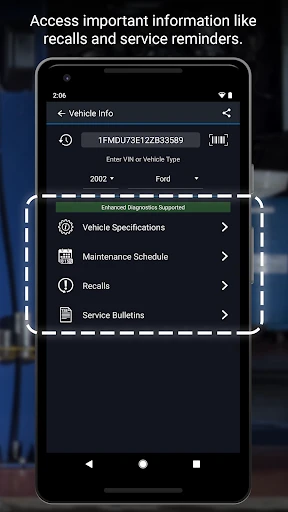
Your Pocket-Sized Automotive Expert: The BlueDriver OBD2 Scanner
Introducing Your BlueDriver
Let's begin with the effortless setup. Getting started with the BlueDriver is remarkably straightforward. Simply take the compact scanner and plug it into your vehicle's OBD2 port, usually located beneath the dashboard. Then, pair it via Bluetooth with your smartphone. The process is quick and uncomplicated, eliminating any fuss with wires or complex procedures.
Key Features That Impress
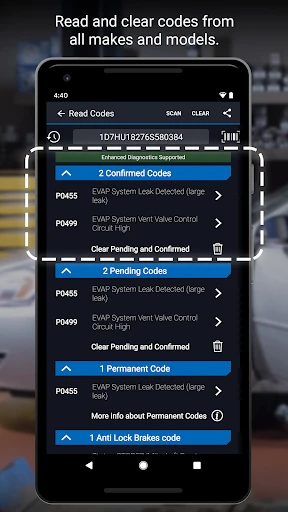
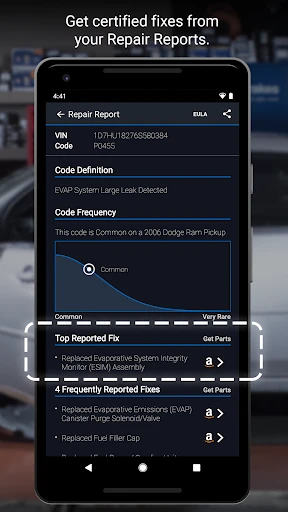
This powerful tool comes packed with capabilities that make it indispensable. The companion app, available on iOS and Android, boasts an intuitive interface designed for users of all experience levels. It provides comprehensive diagnostics, including reading and clearing check engine lights as well as creating clear, actionable repair reports.
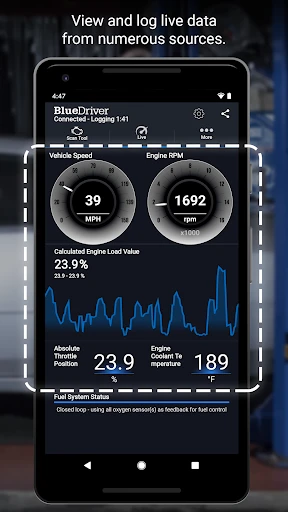
A particularly standout capability is the live data streaming function. This allows you to observe real-time vehicle parameters such as engine speed and fuel system status, offering a detailed, moving snapshot of your car's performance. It's ideal for DIY enthusiasts or any driver wishing to keep a close eye on their vehicle's health.
The BlueDriver Advantage
Having tested various OBD2 scanners, the BlueDriver distinguishes itself in several important ways. Notably, it delivers the same advanced, manufacturer-specific diagnostics used by professionals. It provides enhanced data for brands including Ford, GM, Chrysler, and Toyota, effectively placing a specialist's insight in the palm of your hand.
Furthermore, the app receives consistent updates that introduce new features and enhancements, ensuring your investment remains current and capable. This ongoing development means the tool evolves, continuously building your knowledge and assurance.
Durable Design and Intuitive Operation
Physically, the BlueDriver is crafted to be robust and compact. Its solid construction avoids any cheap, fragile feel, inspiring confidence in its durability. The small form factor makes it incredibly convenient to store in your glove compartment or carry with you.
The user experience is equally polished. The app's layout is clean and logical, making navigation simple. Whether you're an avid hobbyist or simply seeking to reduce repair costs, the BlueDriver empowers everyone to comprehend their vehicle's needs.
Final Assessment
In summary, the BlueDriver OBD2 Scan Tool fundamentally changes your approach to vehicle care. It promotes proactive maintenance, potentially saving you time and money on service visits. It is a reliable, user-friendly device rich with features that provide profound insight into your car's operational state.
For the automotive enthusiast pursuing peak performance, or the everyday driver who values informed ownership, the BlueDriver is a compelling choice. It serves as a dedicated personal consultant for your vehicle, always available when required.
Pros
- User-friendly interface for easy navigation.
- Comprehensive diagnostic reports.
- Wireless connectivity via Bluetooth.
- Compatible with both Android and iOS.
- Regular updates with new features.
Cons
- Limited vehicle coverage.
- Occasional connectivity issues.
- Subscription required for advanced features.
- Interface can be slow.
- Requires a stable internet connection.
Frequently Asked Questions
What is the BlueDriver OBD2 Scan Tool used for?
The BlueDriver OBD2 Scan Tool is a powerful diagnostic tool designed for car owners and mechanics to quickly identify and troubleshoot vehicle issues. It connects to your vehicle's OBD2 port and provides detailed reports on engine codes, ABS, airbag, and other system faults. With this tool, you can save time and money by diagnosing problems without visiting a mechanic.
Is the BlueDriver OBD2 Scan Tool compatible with my vehicle?
BlueDriver is compatible with all vehicles sold in the United States and Canada since 1996 that are equipped with an OBD2 port. It works with most makes and models, but it's always a good idea to check the manufacturer's website for a complete list of supported vehicles to ensure compatibility with your specific car.
How do I connect the BlueDriver OBD2 Scan Tool to my smartphone?
Connecting the BlueDriver OBD2 Scan Tool to your smartphone is straightforward. First, plug the device into your car's OBD2 port. Then, download the BlueDriver app on your iOS or Android device. Once installed, open the app and pair it with the scan tool via Bluetooth. Follow the in-app instructions to complete the setup and start diagnosing your vehicle.
What features does the BlueDriver app offer beyond scanning?
Beyond scanning for engine codes, the BlueDriver app offers a range of features designed to enhance your diagnostic experience. It provides repair reports with detailed information on how to fix detected issues, live data streaming for real-time monitoring, smog check results, and the ability to freeze frame data. These features make it a comprehensive tool for both DIY enthusiasts and professional mechanics.
Is there any ongoing cost or subscription required for using BlueDriver?
No, there are no ongoing costs or subscription fees required for using the BlueDriver OBD2 Scan Tool. Once you purchase the device, all app features are accessible at no additional cost. This makes it a cost-effective solution for those looking to perform regular diagnostics on their vehicles without incurring extra expenses.
Technical Info
Recommended For You

Holy Bible Time-Verses&Audio

Car Engine Sounds - Gas Pedal

Video AI - AI Hug & Kiss Maker

Bible App by Olive Tree

Perfect365 Makeup Photo Editor

Shopify Point of Sale (POS)

Easy Hairstyles for Girls
N6_Theme for Car Launcher app

Job Search by ZipRecruiter

Dictionary.com: English Words

All Document Reader:PDF Viewer

Discount Tire

Picrew PFP & OC Maker

AI Art Generator: AI Picture

FlipArtify - 2D Draw Animation

Photo Editor - Retouch Photos

LogMeIn Rescue Customer

The Language of Letting Go

AlfaOBD

Invitation Maker & Card Design

Etsy Seller: Manage Your Shop

Spellai - AI Art Maker

AGAMA Car Launcher
