Gospel Library
Books & Reference · Gospel Library LDS Scriptures Study Resources Members
Screenshots

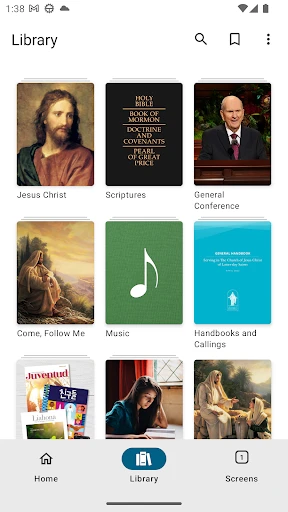


A Digital Spiritual Companion: Exploring the Gospel Library App
Have you ever wished for immediate access to spiritual resources during a quiet moment away from home? I certainly have, and the Gospel Library app transforms that wish into reality. This application serves as a portable collection of sacred texts and study aids, placing an extensive array of scriptures, manuals, and educational content directly on your device. It is the perfect partner for daily commutes, breaks, or personal reflection, ensuring your spiritual learning is always within reach.
Getting Started with the Application
Beginning your journey is simple. The Gospel Library app is readily available for download on both Android and iOS devices through their respective stores. After installation, a clean and user-friendly interface welcomes you. The design is intuitive, allowing users of all technical abilities to find their way without confusion. Immediately, you will notice how materials are logically categorized, a detail that appeals to anyone who appreciates orderly and efficient access to information.
Essential Features for Enhanced Study
A standout tool is the robust search capability. Struggling to locate a specific verse or quote from a talk becomes much less frequent. This powerful function scans across scriptures, church magazines, and conference addresses, delivering precise results quickly. It effectively acts as a dedicated research aide, ready to retrieve the reference you seek.
Equally important is the option to save materials for offline reading. This feature is indispensable for travel or areas with unreliable connectivity. By downloading chosen books, lessons, or talks beforehand, you guarantee uninterrupted study sessions regardless of your location or internet status.
Personalizing Your Study Experience
To foster deeper engagement, the app provides adaptable study plans. These can be tailored to your personal timeline and interests, offering valuable structure during hectic periods when maintaining a study habit is challenging. Additionally, audio playback for many texts accommodates auditory learners and allows for spiritual enrichment during other activities like driving or exercising.
The annotation tools significantly enrich the study process. You can highlight passages in various colors, attach personal notes, and bookmark important pages for future review. This suite of features creates a digital journal of your insights, seamlessly integrated into your study materials.
Final Impressions
In summary, the Gospel Library app has become a fundamental asset for my spiritual development. It is more than software; it is a dedicated guide that simplifies, enriches, and personalizes the learning process. From seasoned scholars to those beginning their exploration, this app delivers a depth of resources suited for every stage of discovery. I highly recommend downloading it—it may well become a cherished component of your everyday life.
Pros
- Extensive library of religious texts
- Seamless offline access
- User-friendly interface
- Regular content updates
- Multi-language support
Cons
- Limited multimedia content
- Occasional app crashes
- Requires regular updates
- Some features need internet
- Interface can be overwhelming
Frequently Asked Questions
What is Gospel Library and what can I find in it?
Gospel Library is a comprehensive mobile application designed to help members of The Church of Jesus Christ of Latter-day Saints to study, search, and explore Church content. The app includes scriptures, general conference talks, manuals, music, videos, audio recordings, magazines, and much more. It serves as a digital library for users to access religious content at their convenience.
Is Gospel Library available for both Android and iOS devices?
Yes, Gospel Library is available for download on both Android and iOS platforms. Users can find the app on the Google Play Store for Android devices and the Apple App Store for iOS devices. This ensures accessibility for a wide range of users, regardless of their device preference.
Can I use Gospel Library offline, and how do I download content for offline use?
Gospel Library offers the ability to download content for offline use, which is particularly useful when access to the internet is limited or unavailable. Users can download scriptures, conference talks, and other materials directly onto their devices by selecting the desired content and choosing the download option provided in the app.
How can I customize my study experience in Gospel Library?
Gospel Library allows users to personalize their study experience through features like highlighting, note-taking, and bookmarking. The app provides tools to mark important passages, write notes, and organize content into study plans or reading lists. Synchronization across devices ensures that your customizations are available wherever you use the app.
Is Gospel Library available in multiple languages, and how do I change the language settings?
Gospel Library supports multiple languages, catering to a global audience. To change the language settings, users can navigate to the app's settings menu and select their preferred language. This feature makes the app accessible to non-English speakers and helps users engage with content in their native language.
Technical Info
Recommended For You

EVgo - Fast EV Charging

Doodle Art: Magic Drawing App

BeautifyX - AI Makeover Studio

HD Camera for Android

Beauty Calculator Pretty Scale

네이버 - NAVER

AARP SafeTrip™

ShiftLock

FantacyStory: novels, fictions

Mirror Study Bible

Job Hai - Search Job, Vacancy

e-Sword: Bible Study to Go

myQQ – Quick Quack

Adobe Scan AI PDF Scanner, OCR

Bolt for Tesla - Tasker Plugin

Daily Bible Study: Audio, Plan

Desygner: Graphic Design Maker

Joist Invoices for Contractors

Jobber: Field Service Software

WhatColors: AI Color Analysis

Biblia Católica en español

CL Theme Road

WOMBO Dream - AI Art Generator