
Boat AI Browser: Web & Tools
Business · Boat AI Browser Smart Web Surfing For Modern Users
Screenshots
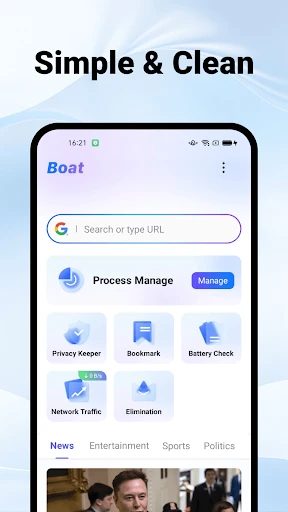


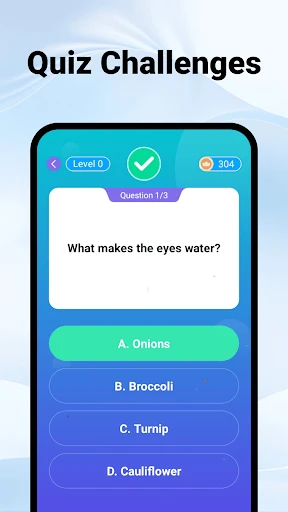
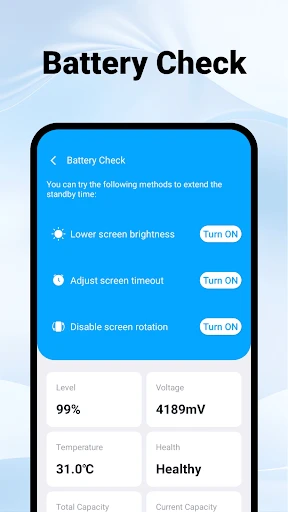
Boat AI Browser: A Streamlined Digital Experience
Meet Boat AI Browser: Web & Tools, a sophisticated mobile application designed to redefine your internet navigation. In a crowded market of digital browsers, this app distinguishes itself by blending intelligent functionality with user-centric design. Let's explore what it offers.
First Impressions: Interface and Usability
Launching Boat AI Browser reveals a thoughtfully organized and clutter-free interface. The initial view is intuitive, prioritizing accessibility over complexity. This clean aesthetic ensures your focus remains on web content, facilitating a seamless and distraction-free start to your browsing session.
Adaptable Features and Customization
A core strength is its fully customizable toolbar, which empowers you to personalize your workflow. You can integrate your most-used utilities—such as the download manager, night mode, or visual themes—through a simple drag-and-drop interface, crafting a browser that aligns perfectly with your habits.
The floating tab feature further enhances multitasking. It allows you to open links in a persistent, movable window over your primary browser screen, enabling efficient parallel browsing without losing your place.
Performance and Reliability
Performance is a key consideration, and Boat AI Browser delivers consistent speed and stability. Pages render promptly, and the application handles multiple tabs with efficiency, maintaining responsiveness without noticeable lag or unexpected closures, ensuring a dependable daily browsing experience.
Security and Privacy Controls
In today's digital landscape, Boat AI Browser provides robust privacy tools. Its incognito mode offers discreet browsing, while integrated pop-up and ad-blocking capabilities reduce distractions and potential security risks. These features work to create a cleaner and more secure environment.
You are afforded detailed control over your digital footprint through configurable security settings. Options for managing cache, cookies, and activating do-not-track requests place comprehensive privacy management directly in your hands.
Conclusion: Assessing the Application
Boat AI Browser: Web & Tools presents a compelling package of customization, performance, and privacy. It is suited for users seeking a tailored and efficient mobile browsing solution that does not compromise on control or security. For those contemplating a switch, this app warrants serious consideration for your digital toolkit.
Pros
- Fast browsing speeds
- User-friendly interface
- Supports multiple tabs
- Customizable options
- Integrated ad blocker
Cons
- Occasional crashes
- Limited extensions
- In-app ads
- Requires frequent updates
- Consumes high battery
Frequently Asked Questions
What features does Boat Browser offer to enhance my browsing experience?
Boat Browser is designed to provide a seamless and efficient browsing experience. It includes features like customizable themes, gesture control for easier navigation, and a built-in speed dial for quick access to your favorite sites. Additionally, it supports add-ons to extend functionality, ensuring a tailored browsing experience for each user.
Is Boat Browser compatible with both Android and iOS devices?
Yes, Boat Browser is available for both Android and iOS platforms. It is designed to work smoothly on a wide range of devices, ensuring that you can enjoy a consistent browsing experience regardless of the operating system. Make sure to download the app from the official app stores to ensure compatibility and security.
How does Boat Browser ensure my online security and privacy?
Boat Browser prioritizes user security and privacy by implementing features such as incognito mode for private browsing and built-in ad blockers to prevent unwanted tracking. Additionally, it offers HTTPS encryption to secure your data during transmission, helping you browse safely and protect your personal information.
Can I customize the user interface in Boat Browser to suit my preferences?
Absolutely! Boat Browser offers extensive customization options. You can change themes, set up your homepage, and organize bookmarks according to your preferences. The browser also supports gesture controls, allowing you to customize how you navigate through web pages, making your browsing experience more personalized and efficient.
What should I do if I encounter issues or need support while using Boat Browser?
If you run into any problems while using Boat Browser, there are multiple support options available. You can visit the official website for FAQs and troubleshooting guides or contact customer support directly through the app. Additionally, user communities and forums can be helpful resources for resolving issues and sharing tips.
Technical Info
Tags
Recommended For You

Amazon Flex

Job Search by ZipRecruiter

King James Bible (KJV)

Discount Tire

Resume Builder - CV Engineer

Holy Bible - Verse+Audio

Avigilon Alta Open

telebirr

Vehicleinfo - RTO Information

Carista OBD2

[KNA003] SHADOW

GigU

La Biblia en Español

TurboScan™ Pro: PDF scanner

Motive Driver

CL theme V1

ParkMobile: Park. Pay. Go.

Biblia Reina Valera en español

Holy Bible Study

Hicut:Face Swap AI Video App

850 OBD-II

Paint

Sunoco: Pay fast & save
